

Think of healthcare practice management software (PMS) as the digital command center for a modern clinic. It's the integrated system that handles all the non-clinical, operational heavy lifting—everything from the moment a patient books their first visit to the final payment being processed. This software automates the administrative grind, freeing up your team to focus on what actually matters: patient care.
The Operational Heart of Your Clinic
At its core, healthcare practice management software exists to fix a chronic problem that plagues so many clinics: operational chaos. Before systems like this became common, practices were run on a messy combination of paper files, clunky spreadsheets, and a handful of separate, non-communicating programs. This created frustrating data silos, opened the door for costly errors, and ate up countless hours of staff time.
It’s like trying to run a business with a dozen different calendars and address books that don't sync. A PMS brings everything together. It coordinates all the different administrative functions, creating a smooth, predictable workflow where there was once friction and confusion.
From Manual Chaos to Automated Clarity
The main job of a PMS is to bring order to the business side of medicine. It takes those repetitive, mind-numbing tasks and puts them on autopilot. This isn't just about moving faster; it's about reducing the risk of human error, which is a massive liability when you're handling sensitive patient data and complex billing codes. For example, instead of a staff member spending hours on the phone making reminder calls, the system automatically sends texts and emails.
This shift to automation delivers some powerful advantages:
- Lifts the Administrative Burden: Your team gets to spend less time shuffling papers and more time on high-impact work, like interacting with patients and coordinating their care.
- Strengthens Financial Health: Automated billing and claims processing mean fewer mistakes, quicker payments from insurance, and a much healthier revenue cycle.
- Improves the Patient Experience: Tools like online scheduling and patient portals put patients in the driver's seat, offering convenience that boosts satisfaction. A 2022 survey revealed that a staggering 61% of patients have bailed on appointments simply because scheduling was a hassle.
A summary of how a PMS organizes these key areas is outlined below.
Core Functions of Healthcare Practice Management Software
This table breaks down the primary operational areas that a typical PMS manages, showing how it supports a clinic's entire workflow.
| Operational Area | Functionality | Impact on Practice |
|---|---|---|
| Patient Scheduling | Manages appointment calendars, automates reminders (email/SMS), and offers online self-scheduling portals. | Reduces no-shows, optimizes provider schedules, and improves patient convenience. |
| Billing & Invoicing | Generates invoices, processes payments, manages superbills, and automates claim scrubbing and submission to insurance. | Speeds up revenue collection, minimizes claim denials, and reduces administrative overhead. |
| Clinical Documentation | Centralizes patient charts, treatment notes, and medical histories. Often integrates with Electronic Health Records (EHR). | Ensures accurate and accessible patient records, supports continuity of care, and aids in compliance. |
| Patient Engagement | Provides secure patient portals for communication, form completion, and access to health records. | Empowers patients, enhances communication between visits, and reduces staff time spent on routine inquiries. |
| Reporting & Analytics | Tracks key performance indicators (KPIs) like revenue, patient volume, and appointment trends. | Offers data-driven insights for better business decisions, identifies growth opportunities, and spots operational issues. |
| Security & Compliance | Enforces access controls, encrypts data, and maintains audit trails to meet standards like HIPAA. | Protects sensitive patient information, mitigates legal and financial risks, and ensures regulatory adherence. |
By integrating these functions, a PMS creates a single source of truth for all non-clinical operations, making the entire practice run more smoothly.
A well-chosen practice management system doesn’t just check off tasks on a list; it cultivates a more organized, efficient, and patient-focused environment. It builds the foundation for a practice that can grow without getting swamped by its own administrative complexity.
Ultimately, by centralizing information and automating workflows, a PMS is the key to getting, being, and staying organised. It's the digital backbone that supports every interaction, ensuring a seamless experience for your team and your patients alike.
Exploring the Essential Modules of Practice Management Systems
A great healthcare practice management software isn’t just one big program. It’s more like a team of specialists, a collection of distinct modules that work together to run your clinic’s operations. Each module has a specific job, and when they’re all connected properly, they create a smooth, efficient system that keeps the entire practice humming.
Think of it as the central nervous system of your clinic. Just like a car needs an engine, a transmission, and a steering wheel to get anywhere, your practice needs tools for scheduling, billing, and patient communication to succeed. Let’s break down these essential building blocks.
Mastering Patient Scheduling and Appointment Management
The scheduling module is often a patient's very first interaction with your practice, making it ground zero for their entire experience. A clunky scheduling process is a massive source of frustration—in fact, studies show a staggering 61% of patients have bailed on appointments just because booking them was a pain. The right software flips this from a potential bottleneck into a real advantage.
A modern scheduling module handles everything from the initial booking to the final follow-up.
- Online Self-Scheduling: Patients can hop online anytime, see your open slots, and book for themselves. This frees up your front desk and offers patients the 24/7 convenience they expect.
- Automated Reminders: The system automatically sends text and email reminders, a simple trick that drastically cuts down on no-shows and last-minute cancellations.
- Waitlist Management: When a spot opens up from a cancellation, the system can instantly ping patients on a waitlist. It's a smart way to keep your calendar packed and your day running efficiently.
This one module essentially acts as your practice's air traffic control, expertly managing the flow of patients and making the most of every provider's time.
Driving Revenue with Medical Billing and Coding
If scheduling is the front door, the medical billing module is the financial engine keeping the lights on. This is where your revenue cycle lives and breathes, and its efficiency has a direct impact on your bottom line. Doing this manually is a recipe for errors, which leads to denied claims, late payments, and money left on the table.
A solid billing module automates this entire complex workflow. It generates invoices, processes payments, and, critically, manages insurance claims. The software "scrubs" claims for mistakes before they're even sent, checking for the right medical codes and making sure all the information is there. This single step dramatically increases the number of claims that get approved on the first try.
By automating claim submissions and simplifying how payments are handled, the billing module transforms a historically messy and mistake-prone process into a predictable, efficient revenue stream.
This automation not only gets cash in the door faster but also liberates your staff from mind-numbing data entry and endless follow-up calls with insurance companies.
The image below shows how these core modules—scheduling, billing, and reporting—are all interconnected pieces of one central system.
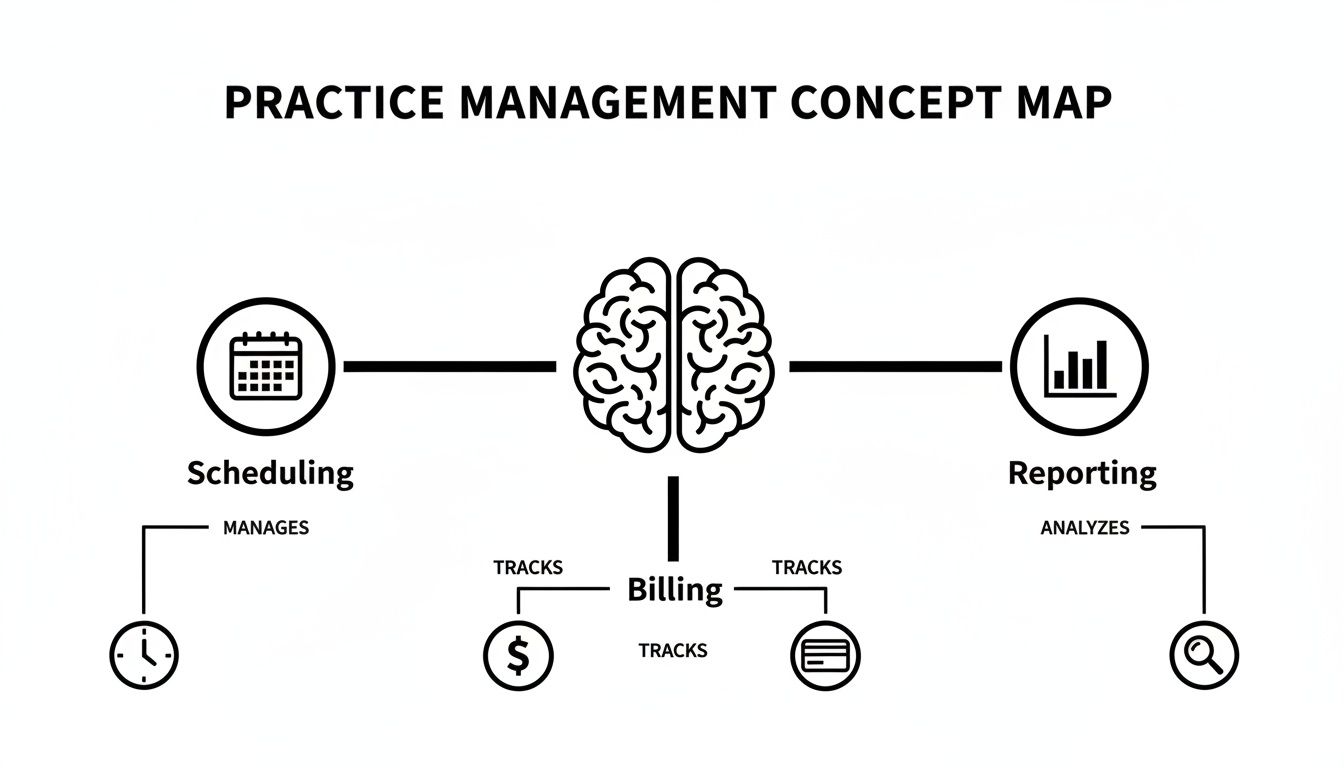
This visual makes it clear: a truly effective system doesn't see these as separate jobs. It treats them as integrated parts that share information to give you a complete picture of your practice's health.
Unifying Care with EHR and EMR Integration
While your practice management software runs the business side of things, an Electronic Health Record (EHR) or Electronic Medical Record (EMR) system is all about the clinical data. For any modern practice, a seamless connection between these two systems is completely non-negotiable. When they talk to each other, information flows freely between the administrative and clinical teams.
Here’s how it works in the real world: a receptionist updates a patient's address in the PMS, and that change instantly appears in their clinical chart inside the EHR. After an appointment, a provider finalizes their notes in the EHR, and the right billing codes are automatically sent to the PMS to get the claim started. This simple connection gets rid of duplicate work and slashes the risk of human error, which is crucial for staff who need to keep track of time and focus on what matters most—the patients.
Fostering Relationships Through Patient Engagement Tools
Finally, today’s practice management software goes beyond the four walls of your clinic by including patient engagement tools. These features give patients the power to be more involved in their own care, which builds stronger relationships and leads to better health outcomes.
Common patient engagement features include:
- Secure Patient Portals: A private online space where patients can check lab results, ask for prescription refills, pay bills, and send secure messages to their care team.
- Digital Intake Forms: Patients can fill out all the necessary paperwork from home before their visit. This means less time in the waiting room and more accurate data for you.
- Two-Way Secure Messaging: A direct, secure line for patients to ask non-urgent questions, putting an end to frustrating games of phone tag.
When all these modules work together, they form a cohesive system that manages the patient's entire journey. From that first phone call to their ongoing care, every administrative touchpoint becomes as smooth and professional as the clinical care you provide.
Integrated Platforms vs. Standalone Tools: Why Unity Wins
Imagine trying to build a modern car using parts from a dozen different manufacturers. You might get a great engine from one company and a fantastic transmission from another, but making them communicate would be an operational nightmare. That’s exactly what many healthcare practices do when they piece together their technology from a collection of separate, disconnected tools.
When you have a "cobbled-together" tech stack—one app for scheduling, another for billing, and a third for patient messages—you create friction at every turn. Each tool becomes its own little island of information, creating data silos that prevent you from ever seeing the full picture of your practice's health. Your team ends up wasting precious time manually re-entering patient details or toggling between screens, a process practically begging for human error.
This disjointed setup doesn't just slow you down; it opens you up to serious risks. Juggling multiple vendors means managing multiple security protocols, different compliance standards, and a tangled web of support contracts. It’s an administrative drag that quietly siphons resources and attention away from what truly matters: patient care.
The Power of a Unified Ecosystem
An integrated healthcare practice management software platform is built on a totally different philosophy. Instead of patching together systems that were never meant to meet, it gives you a single, unified ecosystem where every function works in perfect harmony from the start. Think of it as having one expertly drawn blueprint for your entire practice.
This unified approach immediately solves the problems of a fragmented system.
- Seamless Data Flow: Information entered once is instantly available everywhere it's needed. Update a patient's insurance at the front desk, and the billing module has it ready for the next claim—no questions asked.
- A Single Source of Truth: With all your data in one place, you get a crystal-clear view of your practice's performance. You can run reports connecting scheduling trends to revenue without ever having to export and merge a single spreadsheet.
- Simplified Support and Accountability: When something goes wrong, you have one number to call. No more finger-pointing between vendors. You have a single point of contact whose only job is to get you back up and running.
This isn’t just about convenience; it's a strategic advantage. It’s no surprise that integrated systems—those combining scheduling, billing, and clinical functions—dominate the market, holding between 61.88% and 74.4% of product market share. This shift happened because practices grew tired of juggling 8-12 different vendors, each with its own security risks and operational headaches. You can discover more insights about these market trends and their impact on practice efficiency.
Stronger Security and Simpler Compliance
In healthcare, data security and HIPAA compliance aren't optional. Trying to manage these responsibilities across a dozen different tools is a high-stakes gamble. Each vendor is a potential weak link, and ensuring every single one meets the industry's tough security standards is a constant battle.
An integrated platform centralizes this entire burden. Security protocols are consistent across the whole system, and you can manage who sees what from a single dashboard.
An integrated system creates a digital fortress with one set of keys, rather than a collection of separate rooms each with its own lock. This centralized control makes it far easier to enforce security policies, conduct audits, and maintain a clear, unified compliance trail.
This not only lowers your risk but also makes proving compliance infinitely easier. When auditors come knocking, you can pull comprehensive reports from one system instead of chasing down records from multiple vendors. It’s a streamlined approach that offers peace of mind, freeing your team to focus on patients with the confidence that their sensitive data is protected by a cohesive, end-to-end security framework.
Finding the Right Software for Specialized Practices

A family doctor's office and a high-end medical spa are worlds apart in how they operate. Trying to run both using the same generic software is like asking a master chef to cook a gourmet meal with nothing but a microwave—you just can't get the right results without the right tools.
This is why effective healthcare practice management software is never a one-size-fits-all solution. The best systems are built to support the specific clinical workflows, business models, and patient expectations that define your practice. Choosing software that actually understands your specialty’s unique demands is the first step toward true operational success.
Medical Spas and Aesthetic Practices
The world of aesthetic medicine is a unique blend of healthcare, retail, and hospitality. Here, patients are clients, treatments are often sold in packages, and memberships are a key part of the business model. Standard medical software just wasn't designed to handle this commercial reality.
A medspa’s software needs to do a lot more than just book appointments. It has to manage the business side of aesthetics with features like:
- Membership and Package Management: The system must be able to create, track, and automatically bill for recurring memberships or pre-paid treatment bundles.
- Treatment-Specific Consent Forms: You need to easily manage different consent forms for injectables, lasers, and other procedures, then store them securely in the patient's file.
- Integrated Inventory Tracking: When you're selling skincare products, your software has to track stock levels and tie those sales directly to patient records.
Without these tools, your staff is stuck juggling spreadsheets and separate payment terminals, which is a recipe for administrative chaos.
Primary Care and Wellness Clinics
For primary care practices, the game is all about long-term health, preventive care, and managing chronic conditions. The right software here acts less like a simple tool and more like a partner in population health, helping you keep tabs on your entire patient panel, not just the people who happen to have an appointment today.
A primary care PMS is designed to support continuity. Its core job is to help the practice manage long-term patient relationships and proactively address health needs before they become urgent problems.
This is where efficiency becomes critical for handling high patient volumes without sacrificing quality. Look for key features like:
- Preventive Care Reminders: The system should automatically flag patients due for annual check-ups, vaccinations, or routine screenings, making proactive outreach simple.
- Chronic Disease Management Tools: Dashboards that let providers see key metrics for patients with conditions like diabetes or hypertension are essential for effective long-term care.
- Robust Patient Portals: A good portal is non-negotiable. It lets patients request refills, see lab results, and ask simple questions without booking a full appointment, freeing up your phone lines and staff.
For primary care, the software must be a powerhouse of organization and communication, helping you deliver consistent, quality care across a large and diverse patient population.
Specialty and Concierge Practices
Specialty and concierge clinics build their entire brand on providing a premium, personalized service. Their patients are paying for a higher level of access and coordination, and your software has to empower your team to deliver that white-glove experience. The focus shifts from high volume to high-touch, detailed service.
These practices depend on software with a very different set of capabilities:
- VIP Patient Services: The system should allow staff to tag patients with specific preferences or notes, ensuring every interaction feels personal and thoughtful.
- Tiered Membership Models: For concierge practices, the software must seamlessly manage different service tiers, each with its own billing rules and included benefits.
- Advanced Communication Coordination: The platform needs to simplify complex scheduling, like coordinating appointments with other specialists, labs, or hospitals on the patient's behalf.
In this environment, the software becomes a central hub for client relationship management. It helps your practice remember the small details that make patients feel truly valued—the very foundation of the concierge model. If you're considering this path, you'll want to understand the business fundamentals, which we cover in our guide to starting a business in the healthcare sector.
How to Choose and Implement Your New Software
Picking and launching new healthcare practice management software can feel like a massive project. It's easy to get overwhelmed. But if you approach it with a solid plan, you can turn a potentially daunting task into a strategic upgrade for your entire practice. Remember, you're not just buying software; you're choosing a partner that will be at the core of your operations for years to come.
The first step is a deep dive into potential software vendors. Your job is to look past the slick sales demos and really scrutinize the features that will affect your day-to-day work and your ability to grow. This is the time to ask the hard questions and make sure every promise holds up.
Creating Your Vendor Evaluation Checklist
Before you even glance at a single product, you need to define what a "win" looks like for your practice. Think of it like creating a scorecard. What are your biggest administrative headaches right now? Where are the frustrating bottlenecks in your workflow? Answering these questions first gives you a clear set of criteria to judge every option against.
Your checklist absolutely must include a few non-negotiables:
- Security and HIPAA Compliance: This is ground zero. A vendor has to show you exactly how they protect data, what encryption they use, and how their system keeps you compliant. Don't be shy—ask for their certifications and audit reports.
- Scalability for Growth: The software that fits you today needs to grow with you tomorrow. Can it handle more staff, another location, or a sudden spike in patient volume without slowing to a crawl?
- Integration Capabilities: Your practice management software doesn't exist in a bubble. It has to play nicely with your other critical tools, like labs, pharmacies, and especially your current Electronic Health Record (EHR) system.
Choosing a software vendor is fundamentally about risk management. You are entrusting them with your most sensitive patient data and the core of your business operations. Due diligence at this stage prevents major headaches later on.
You'll also need to decide on a deployment model. Cloud-based systems have really taken over, now accounting for between 56.02% and 75.5% of the market. It’s no surprise, really. Practices are moving away from maintaining expensive on-site servers, preferring the lower upfront costs and minimal IT headaches that come with the cloud.
Mapping Out a Successful Implementation
Once you've picked your software, the real work begins: implementation. A clear project plan is your roadmap here. It ensures everyone on your team is on board and that the transition doesn't disrupt patient care.
A realistic timeline is your best friend. Break the entire process down into smaller, more manageable phases:
- System Configuration: This is where you and the vendor tailor the software to your clinic's unique way of doing things. You’ll customize everything from appointment types to billing rules.
- Data Migration: Moving your data is probably the most delicate part of the whole process. You need a meticulous plan to transfer patient demographics, appointment histories, and financial records. Always, always do a test migration first to catch problems before they become catastrophes.
- Staff Training and Adoption: Great tech is useless if your team doesn't know how to use it. Set aside dedicated time for hands-on training for everyone, from the front desk to the billing department. And don't stop there—ongoing support is key to making the change stick.
Measuring Your Return on Investment
So, how do you know if this big investment was actually worth it? Measuring your return on investment (ROI) isn't just about the price tag. It's about tracking real financial gains and tangible improvements in how your practice runs.
Here are a few key metrics to keep an eye on:
- Financial Gains: Look at your revenue cycle. Are you seeing fewer claim denials? Is the time it takes to get paid shrinking? You can dig deeper into this by reviewing our guide on invoicing best practices.
- Operational Efficiencies: Put a number on the time you're saving. How many fewer hours is your front desk spending on the phone scheduling appointments? Has manual data entry been cut down?
- Patient Satisfaction: Check the patient feedback. Are more people using the online portal? Have your no-show rates dropped because of the automated reminders?
By tracking these numbers, you’ll have a clear, undeniable picture of the value your new software is bringing to your practice.
The Future of Practice Management

Practice management software is evolving at a breakneck pace, moving well past its early days as just a digital filing cabinet. We're watching it become an intelligent, strategic core for modern clinics—a tool that doesn't just manage the day-to-day but actively drives growth and elevates patient care.
This whole shift is being fueled by new technologies that are completely changing the game. Think AI that can predict no-shows before they even happen, allowing you to optimize your schedule on the fly. Or imagine telehealth services woven so seamlessly into the platform that they feel like a natural extension of your in-office care, not just a clunky add-on.
The market's explosive growth tells the story. Valued recently at $13.41 billion, the global market is expected to rocket to $40.14 billion by 2034. That kind of jump shows just how essential these systems have become. You can dive into the full research about this market expansion to see the detailed projections.
From Utility to Strategic Asset
The practices that will thrive are the ones that can turn raw data into smart decisions. Advanced business intelligence (BI) dashboards are no longer a luxury; they’re becoming a standard feature, giving you a live look at your clinic's financial health, patient outcomes, and satisfaction levels. This puts you in the driver's seat, able to make informed choices that boost both your bottom line and the quality of care.
Modern practice management software is no longer just an administrative utility. It is the future-proof foundation for a resilient, efficient, and patient-centric clinic, moving practices away from fragmented systems toward a unified operational core.
In the end, choosing the right platform is a direct investment in the long-term health of your practice. It builds the foundation you need to adapt, scale, and keep delivering exceptional care, no matter how complex the healthcare environment gets. The choice is pretty clear: get on board with an integrated system or risk falling behind.
Got Questions? We’ve Got Answers.
Diving into healthcare practice management software always stirs up a few key questions. Let's tackle the big ones head-on, covering everything from what you can expect to pay to how your patient data is kept safe.
What’s the Real Cost of Practice Management Software?
The price tag can swing pretty wildly, and it really comes down to what your practice needs. Most modern systems are sold as a subscription, usually priced per provider, per month. You might see numbers anywhere from under $100 for a bare-bones setup to several hundred for a powerhouse platform loaded with specialized tools.
A few things will move that needle:
- The number of providers and staff who need access.
- The features you choose—do you need advanced billing or just the basics?
- The level of hand-holding and support you want.
- The heavy lifting involved in moving your existing data over.
My advice? Always get a detailed breakdown of all costs. You want to see every one-time fee and recurring charge so there are no surprises down the road.
How Does This Software Play with My Existing EHR?
This is a big one. If your practice management software can't talk to your Electronic Health Record (EHR), you’ve got a major problem. Good vendors make this connection seamless using something called an API (Application Programming Interface), which is essentially a secure translator between the two systems.
Think of it this way: a solid integration means that when your front desk updates a patient's phone number in the practice management system, it automatically appears in their clinical chart inside the EHR. No double-entry, no mistakes.
That two-way street is what makes a practice run smoothly. It connects the business side of your office directly to the clinical side.
Is My Patient Data Actually Safe in the Cloud?
It’s completely understandable to be concerned about security. The good news is that reputable software companies pour enormous resources into protecting patient data—often far more than a single practice could afford to.
Here’s how they lock things down:
- End-to-End Encryption: Your data is scrambled and unreadable both while it’s traveling over the internet and while it’s sitting on a server.
- HIPAA Compliance: The software is built from the ground up to meet the strict security and privacy rules of HIPAA.
- Access Controls: You decide who sees what. You can give your biller access to financials and your nurses access to charts, but not the other way around.
When you go with a trusted, cloud-based provider, you're actually choosing one of the most secure ways to manage your practice's information.
Ready to eliminate complexity and unify your practice's operations? Ragnar STACK provides a vertically integrated ecosystem designed for modern healthcare, from IT and security to workflow automation. Discover the Ragnar STACK advantage and see how our all-in-one approach can strengthen your practice.
Share This Story, Choose Your Platform!
LISTEN NOW

CAPTIVATING READS
Our blog is packed with articles and stories based around lifestyle, business, design and wellbeing. Subscribe now to get all of our updated directly to your inbox every week.