

Think of your clinic's software like this: the EMR is the clinical 'brain', the part that meticulously documents every patient's health journey. On the other hand, the Practice Management (PM) system is the operational 'nervous system', handling all the day-to-day logistics like appointments, billing, and scheduling.
They're two different beasts, but getting them to work together is one of the most important things a modern clinic can do.
Defining Your Clinic's Core Technologies
Every medical practice today, big or small, runs on two foundational pieces of software: the Electronic Medical Record (EMR) and the Practice Management (PM) system. It's easy to get them mixed up, but their jobs are distinct, even though they're deeply connected.
An EMR system is all about the clinical side of things. It's the digital version of a patient's chart, holding their entire medical history, diagnoses, medications, lab results, and treatment plans. This is the tool your providers live in during an appointment, helping them make the best possible decisions for the patient in front of them.
A Practice Management system handles everything else—the business of running a clinic. Its world revolves around tasks like:
- Booking patient appointments and sending out reminders
- Checking insurance eligibility and processing claims
- Managing billing, sending invoices, and collecting payments
- Running reports to see how the practice is performing financially
The shift to digital records has been massive. Over 95% of U.S. hospitals are now using these systems, and about 96% of office-based physicians in North America depend on them daily. With around 1.2 billion patient records stored electronically in the United States alone, it's clear the paper chart is a thing of the past.
The Brain and The Nervous System
The "brain and nervous system" analogy is one of the best ways to grasp the EMR and practice management relationship. The EMR is the clinic’s "brain," holding all the crucial patient data and clinical intelligence. The PM system is the "nervous system," coordinating all the administrative and financial signals that keep the practice running.
This flowchart shows how the two systems function as two essential halves of one whole.
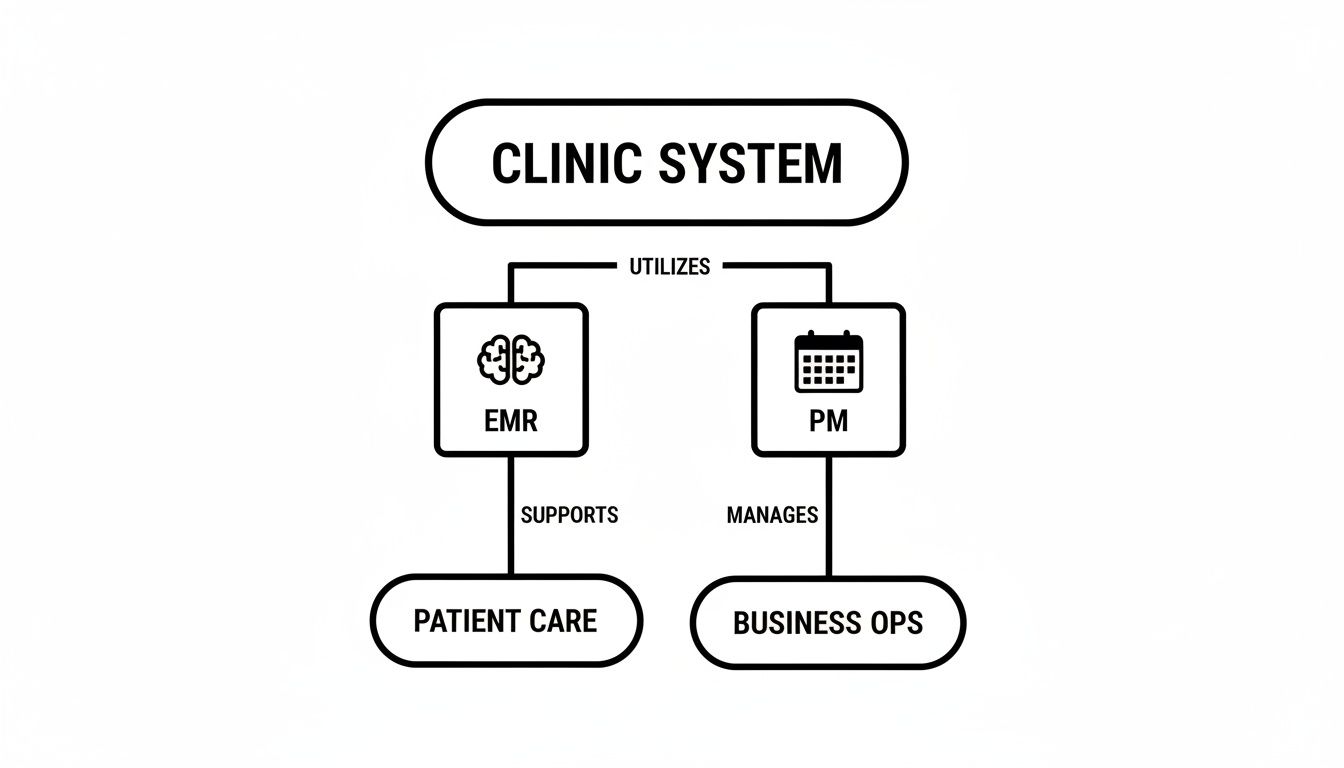
As you can see, the EMR is squarely focused on patient care, while the PM system keeps the business operations humming along. They have different jobs, but they're both essential.
To really nail down the differences, here's a side-by-side look at what each system handles.
EMR vs Practice Management At a Glance
| Core Function | EMR System (The Clinical Brain) | Practice Management System (The Operational Nervous System) |
|---|---|---|
| Primary User | Physicians, Nurses, Medical Assistants | Front Desk Staff, Billers, Practice Managers |
| Main Goal | Improve patient care and clinical outcomes | Optimize business efficiency and profitability |
| Key Features | Charting, e-prescribing, lab orders & results | Scheduling, billing, insurance claims, reporting |
| Data Focus | Patient health information (diagnoses, allergies) | Patient demographics and financial data |
| Typical Use Case | Documenting a patient visit in the exam room | Booking a new patient's first appointment |
This table makes it clear: one system manages health, and the other manages the business of health. Both are non-negotiable for a modern practice.
When these two systems don't talk to each other, things get messy. Staff end up manually entering the same data twice, which opens the door to errors, wastes a ton of time, and creates a clunky patient experience. This kind of disconnect creates drag on your operations and can even introduce security risks.
For most clinics, the real problem isn't a lack of software, but a lack of integration. When the clinical "brain" can't communicate smoothly with the operational "nervous system," the whole practice feels it.
That's why a unified platform is no longer a luxury—it's essential for any practice that wants to grow. As you start to explore the different EMR systems available, the ultimate goal is to find a solution where these two critical functions aren't just patched together, but are truly built to work as one.
The Hidden Costs of Disconnected Clinic Systems
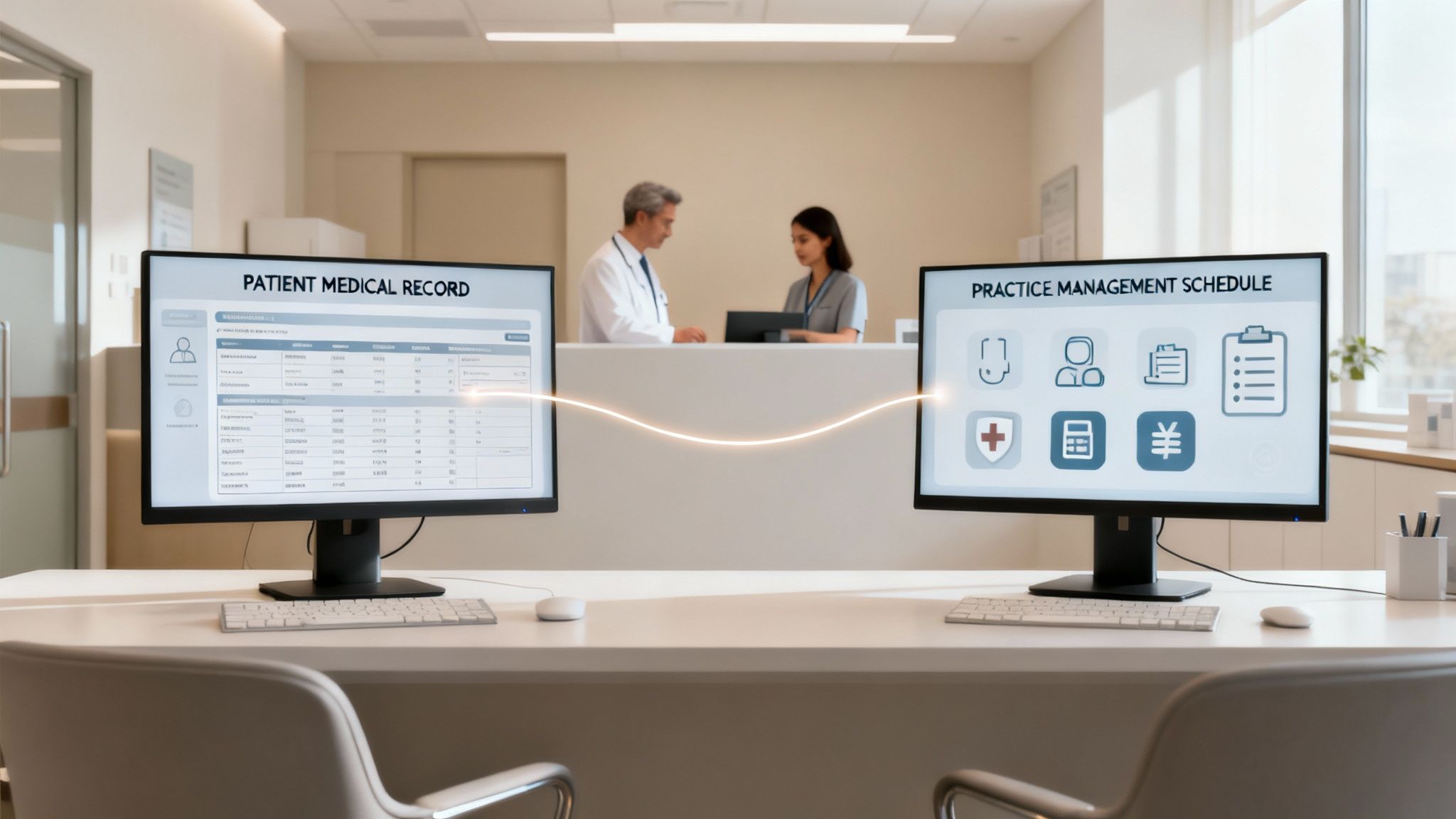
When your EMR and practice management systems don't talk to each other, the entire clinic feels the pain. Just picture the front desk at a busy primary care practice. A new patient walks in, proud that they already filled out their entire health history online. But because the patient portal talks to the EMR and not the PM system, the receptionist has to ask for all the same demographic and insurance info all over again.
Right away, the patient is annoyed, the line is backing up, and their first impression is one of total inefficiency. This isn’t just a small hiccup. It's a clear signal of a bigger operational problem caused by disjointed tech. These seemingly minor frustrations pile up day after day, creating serious hidden costs that eat away at your resources and your team's sanity.
The Domino Effect of Data Disconnects
The trouble that starts at check-in creates a ripple effect across the entire patient visit. When your clinical and administrative data are stored in separate universes, your team is left to build shaky, manual bridges to connect them.
This leads to a few common breaking points:
- Endless Data Re-entry: Your staff spends hours copying appointment details from the PM scheduler into the EMR, then pulling clinical notes back into the billing module. It’s a tedious, repetitive cycle that’s a major driver of administrative burnout.
- A Higher Chance of Errors: Every time someone manually types in data, the risk of a mistake goes up. A simple typo in a billing code gets a claim denied. An incorrect allergy note could have far more serious consequences for a patient.
- Sluggish Financial Cycles: As soon as a provider signs off on a chart in the EMR, your billing team should be able to generate a claim. But with separate systems, they’re often stuck waiting for paper charge slips or end-of-day reports, which grinds your entire revenue cycle to a halt.
It's a startling fact, but studies on medical billing have found that up to 80% of medical bills contain errors. A huge chunk of these are a direct result of the manual coding and data entry mistakes that happen when an EMR and practice management system aren't working as one.
These disconnects create a constant drag on your practice. You end up with highly skilled people acting as human data-entry clerks instead of focusing on what really matters—caring for patients and making the practice run smoothly.
Security Gaps and Vendor Headaches
Beyond the daily operational grind, running two separate systems opens you up to some serious security risks. Each vendor has its own security rules, its own update schedule, and its own support team. This patchwork approach is much harder to manage and leaves you vulnerable.
If a data breach were to happen, good luck figuring out where the problem started. It quickly becomes a game of finger-pointing between vendors. With a single, integrated platform, there's one point of accountability. This makes compliance easier and your overall data security much stronger.
Juggling multiple vendors also means you're juggling multiple contracts, invoices, and support numbers. It makes training a nightmare because your staff has to learn two different interfaces and workflows. This complexity doesn't just cost you money; it costs you time and focus that you could be using to grow your practice and serve your patients. In the end, the real price of disconnected systems is paid in wasted hours, lost revenue, and a patient experience that falls short.
Tying It All Together: The Power of an Integrated Platform

When you’ve seen the headaches caused by separate systems, the answer becomes obvious: a single, integrated platform where clinical and business data can finally talk to each other. This isn't just about bolting on a new piece of software; it's about fundamentally rethinking how your practice runs. By combining your EMR and practice management tools, you build a single source of truth for everything from patient charts to accounts receivable.
This shift puts an end to the mind-numbing, error-prone task of manual data entry. When a patient’s address is updated at the front desk, it's instantly correct in their clinical record. When a doctor finalizes a note, the right billing codes are automatically queued up for the claims team. It’s that seamless connection that truly moves the needle on efficiency.
A Smoother Journey from Check-In to Checkout
An integrated EMR and practice management system turns a series of disjointed tasks into one fluid process. Think about a patient’s experience in a clinic that has its act together. They schedule online, and the system instantly checks their insurance eligibility, long before they walk through the door.
At check-in, they might confirm their details on a tablet, with that information populating both their clinical and billing profiles at the same time. The MA sees they’re ready, pulls up their chart, and the provider documents the visit. The second that provider signs off, the system creates a superbill with the correct codes, all set for the billing department. No paper handoffs, no frustrating delays, and no duplicate work.
This kind of integration has a massive impact. A unified system doesn't just cut down on administrative busywork; it also shores up your finances by catching the human errors that lead to claim denials and payment delays.
This unified approach frees your team to focus on work that actually matters. Instead of hunting for missing files or correcting typos, they can dedicate their time to patient care, proactive follow-ups, and growing the practice. This improved workflow leads directly to happier patients and a healthier bottom line. For a closer look at how these systems drive clinic operations, feel free to explore our guide on healthcare practice management software.
Fewer Vendors, Stronger Security
Juggling a messy collection of different software tools is an operational nightmare and a huge security risk. It’s not unusual for a private practice to be dealing with 8 to 12 different tech vendors, each with its own contract, support line, and security gaps. That complexity creates endless points of failure.
Moving to a single, integrated ecosystem dramatically simplifies vendor management. Suddenly, you have one company to call for support, one invoice, and one security framework to trust. This consolidation is a game-changer for protecting your practice against data breaches and staying on the right side of HIPAA.
A unified platform is inherently more secure. All your data lives and moves within one controlled environment, which minimizes the exposure that comes from constantly passing sensitive information between disconnected apps. This is precisely why a cohesive tech strategy is non-negotiable for modern practices that are serious about both efficiency and security.
Choosing the Right System for Your Practice
Picking a new software platform is a huge decision, one that will echo through your practice for years. The market is absolutely flooded with options, and it’s easy to get overwhelmed by feature lists that all start to blur together.
Here’s the thing: the goal isn’t to find the system with the most features. It's to find the one that fits your unique workflow like a glove. A generic checklist just won’t do.
A bustling primary care clinic operates in a completely different universe than a high-end medical spa or a boutique concierge practice. Trying to shoehorn a one-size-fits-all solution into a specialized workflow is a direct path to staff burnout and operational chaos. You have to start by getting crystal clear on what your practice needs to succeed.
Tailoring Your Search to Your Specialty
The right EMR and practice management system should feel like a natural extension of how you already provide care. To find that ideal match, you have to look at every potential platform through the lens of your specialty. Each type of practice has its own rhythm and its own set of demands, and a good system will support that rhythm, not disrupt it.
Let's dig into what really matters for three common practice models:
- For Medical Spas: You're running a hybrid business that's part clinic, part retail, part hospitality. Your software needs to juggle all three. Think integrated point-of-sale for products, easy ways to sell and track treatment packages, and solid membership management for that crucial recurring revenue.
- For Primary Care & Wellness: The heart of your practice is building long-term patient relationships and focusing on preventative health. You need powerful patient engagement tools, like a secure portal for messaging and record access. You also need a system that can track chronic conditions and automate reminders for routine check-ups.
- For Specialty & Concierge Clinics: Your entire model is built on delivering premium, personalized service. The technology must reflect that high-touch approach. Look for features that let you manage membership tiers, coordinate complex care plans, and ensure seamless communication with your VIP patients.
The ultimate goal is to find a system that feels like it was designed specifically for you. When the software gets out of the way, your team can focus on delivering exceptional care instead of fighting with clunky workarounds.
Adopting this specialty-first mindset ensures you're investing in a tool that solves your real-world problems. For a deeper dive, check out our list of the best practice management software to see how different platforms are built for specific needs.
Feature Checklist for Specialized Practices
Not all features are created equal, and their importance varies dramatically depending on your practice type. The table below breaks down the must-have capabilities for medical spas, primary care, and concierge clinics to help you zero in on what truly matters for your operations.
| Feature | Medical Spa | Primary Care & Wellness | Specialty & Concierge |
|---|---|---|---|
| Integrated Point-of-Sale (POS) | ✔️ | ||
| Membership & Package Management | ✔️ | ✔️ | |
| Advanced Appointment Scheduling | ✔️ | ✔️ | ✔️ |
| Patient Portal & Secure Messaging | ✔️ | ✔️ | |
| Chronic Disease Management Tools | ✔️ | ||
| Customizable Clinical Templates | ✔️ | ✔️ | ✔️ |
| Automated Patient Recalls/Reminders | ✔️ | ✔️ | ✔️ |
| Direct-to-Patient Communication Tools | ✔️ | ✔️ | |
| Inventory Management | ✔️ | ||
| Loyalty & Gift Card Programs | ✔️ |
Use this checklist as a starting point during vendor demos. It’s a simple way to cut through the sales pitch and confirm that a system has the foundational tools your specific practice model relies on every single day.
Essential Questions to Ask Every Vendor
Once you’ve narrowed down your list to a few vendors that seem to fit your specialty, it’s time to get serious. Every salesperson will paint a rosy picture, but you need to uncover what it’s really like to use their system day in and day out.
A live, hands-on demo is non-negotiable. Don’t just watch them click around—come prepared with a script that walks through your clinic's most common scenarios.
Get your team involved, from the front desk staff to your lead clinicians, and don't be afraid to ask the tough questions:
- Workflow Alignment: "Show me exactly how a new patient goes from booking their first appointment online to checking out after their visit in a practice like ours."
- Customization: "How much control do we have over charting templates and intake forms? Can we make them match our exact procedures without calling support?"
- Training and Support: "What does onboarding actually look like? Are we assigned a dedicated person who will know our practice, or do we go into a general support queue?"
- Future Growth: "How does your platform grow with a practice? What's on your development roadmap for the next 12 months that would benefit us?"
By focusing on these practical, real-world questions, you transform a generic sales pitch into a genuine evaluation. You're not just buying software; you're choosing a long-term partner for your practice.
A Practical Guide to System Implementation
Let’s be honest: switching your core practice software can feel like performing open-heart surgery on your clinic's operations. The fear of disruption, data loss, and a frustrated team is very real. It’s the number one reason so many practices cling to inefficient, outdated systems for far too long.
But a successful implementation isn't a frantic, disruptive overhaul. Think of it as a carefully planned marathon, not a sprint. When you break the project down into manageable stages, it stops being a source of anxiety and becomes an achievable goal. With a clear roadmap and a good technology partner, you can navigate the transition smoothly and set your practice up for success with minimal interruption to patient care.
Your Roadmap for a Smooth Go-Live
A successful switch from an old system to a new, integrated EMR and practice management platform always follows a structured, multi-phase plan. Rushing any of these steps is a recipe for chaos. A real technology partner won't just sell you software; they'll guide you through each stage, making sure every detail is handled before you flip the switch.
This process typically includes:
1. Workflow Analysis: The first step is always a deep dive into how your clinic actually operates day-to-day. Your partner should map out every single process—from the moment a patient checks in to when the final payment is posted. The goal is to configure the new system to support how you already work, not force you into a box.
2. Data Migration Planning: Moving patient data is the most delicate part of the entire project. A meticulous plan is needed to extract, clean, and securely transfer all clinical and financial records. This involves rigorous validation checks to ensure 100% accuracy and integrity. There's no room for error here.
3. Comprehensive Staff Training: Your team is the key to a successful launch. Good training is more than just showing people where to click. It involves hands-on sessions tailored to each role, whether it's the front desk, the biller, or the clinicians. Everyone needs to feel confident and competent before the go-live date arrives.
4. A Controlled Go-Live Strategy: Instead of a chaotic "big bang" launch where everything changes at once, a controlled go-live is much smarter. This might mean starting with a single provider or a specific department to work out any kinks in a live environment with minimal risk.
The key to a low-stress implementation is treating it as a collaborative project, not just a software installation. Your vendor should act as a guide, providing expert project management, clear communication, and on-site support to handle any challenges that arise during the critical launch period.
Choosing a Partner, Not Just a Product
The quality of your implementation experience comes down to the partner you choose. A vendor who sells you a license and then vanishes is setting you up for failure. You need a partner who is genuinely invested in your success and offers guidance long after the initial setup.
For practices still weighing their options, understanding the benefits is a great first step. You can learn more about how a cloud-based EMR can transform your practice in our detailed guide.
Ultimately, a well-executed implementation is the bridge between your current operational headaches and a future of greater efficiency. By approaching it with careful planning and the right support, you can ensure the transition is a strategic step forward, not a disruptive setback.
Measuring the Full Value of Your Investment
When you invest in an integrated EMR and practice management system, it's tempting to focus on the price tag. But that's just the tip of the iceberg. The real value isn’t in the day-to-day conveniences; it’s in the long-term strategic gains that reshape your practice.
Think of it this way: your return on investment (ROI) isn't just a number on a spreadsheet. It's a true measure of your practice's health, its ability to weather challenges, and its potential for growth. We need to look past the upfront cost and see how this technology impacts your finances and daily operations on a much deeper level.
Calculating Your True Return on Investment
To really grasp the ROI, you have to account for the financial wins that pop up in different parts of your practice. It’s about adding up all the small efficiencies that snowball into major savings and gains.
- Slash Administrative Costs: Think about all the time your team spends on manual data entry, pulling charts, and submitting claims. An integrated system automates much of this, freeing up hundreds of hours a year. That time can be redirected toward patient care or revenue-generating tasks.
- Supercharge Billing and Collections: One of the biggest financial drains is claim denials from simple coding errors. A unified system minimizes these mistakes, which means you get paid faster and see a real jump in your clean claims rate. Your cash flow will thank you.
- Boost Patient Retention: From seamless online booking to a quick, easy checkout, a smooth patient experience builds loyalty. Remember, it costs far less to keep a happy patient than to find a new one.
The real magic happens when your practice technology stops being just a tool and becomes a strategic asset. It's an investment that doesn't just pay for itself—it actively protects your clinic's financial future and reputation.
This isn't just a niche trend. The global electronic health records market is set to explode, with forecasts projecting an increase of $49.41 billion between 2024 and 2029. This growth is a clear signal of how essential this technology has become. You can discover more insights about EHR market growth on Technavio.com.
Strengthening Security and Compliance
Beyond the numbers, a single-vendor platform delivers a benefit that’s harder to quantify but just as critical: security.
When your EMR and practice management systems are from different vendors, you’re essentially creating multiple weak points for a data breach. Each vendor, each connection, is another potential vulnerability and another layer of complexity when it comes to staying HIPAA compliant.
A unified system brings all your security under one roof. With one partner responsible for protecting your data, you have a single point of accountability and a much stronger defense against cyber threats. This not only makes compliance audits less of a nightmare but also gives you the peace of mind to focus on what really matters: your patients.
Common Questions About Integrated EM-R Systems
Making the switch to a new, integrated system is a big decision, and it’s completely normal to have questions. Once you start narrowing down the options, your focus naturally shifts from a checklist of features to the practical, real-world impact of making a change. Let's tackle the questions that come up most often, so you can feel confident moving forward.
These are the concerns that really matter: timelines, security, and learning from the mistakes others have made before you. Getting straight answers now is the key to a smooth and successful transition.
How Long Does a Typical Implementation Take?
There’s no single answer here—it all comes down to your practice's specific situation. A smaller, single-provider clinic might get everything up and running in as little as 4-6 weeks. On the other hand, a larger, multi-specialty practice with years of complex data to move could be looking at a 3-4 month project.
The real key to success is creating a detailed project plan with your technology partner. This roadmap should map out every single stage, from analyzing your workflows and configuring the system to migrating data securely, training your staff, and planning a careful go-live day.
An experienced partner will guide you through this entire journey, keeping the timeline predictable and ensuring there’s as little disruption to your daily operations as possible.
Is My Patient Data Safe During Migration?
Absolutely. Protecting your data should be the number one priority during any system change. Any reputable vendor will have a migration process built on a foundation of strict, multi-layered safeguards to protect both your practice and your patients.
Think of it like a secured, armored transport. The process involves creating secure backups of your original data, using fully encrypted channels for the transfer, and then performing rigorous validation checks to confirm every single record has been moved accurately and completely.
One of the biggest benefits of working with a single, accountable partner for your EMR and practice management system is that it closes the dangerous security gaps that can open up when data is passed between multiple companies. Always confirm your chosen provider follows a clear, HIPAA-compliant data migration protocol.
What Is the Biggest Mistake Practices Make?
The most common pitfall we see is practices getting distracted by a long list of features and a low price tag, all while completely ignoring how the system actually fits their workflow. It's easy to get sold on bells and whistles you’ll never use, only to find out later that the new system is clunky and actively slows your team down.
The best way to avoid this is to start by deeply understanding your clinic's unique processes. Look for a platform—and more importantly, a partner—that’s designed for your specialty. The right system can be molded to support your workflows, not force you to change them to fit the software. A true partner takes the time to understand how you work first.
Ready to stop juggling vendors and unify your practice with a single, secure ecosystem? Ragnar STACK delivers an integrated platform purpose-built for modern healthcare. Explore how Ragnar STACK can bring efficiency and security to your clinic.
Share This Story, Choose Your Platform!
LISTEN NOW

CAPTIVATING READS

Our blog is packed with articles and stories based around lifestyle, business, design and wellbeing. Subscribe now to get all of our updated directly to your inbox every week.