

So, what exactly is a cloud based EMR? Think of it less like a piece of software you buy and install, and more like a service you subscribe to.
Instead of housing a big, expensive server in a back office, all your patient data and the EMR application itself live on highly secure, remote servers. You and your staff simply access everything you need over the internet. It’s the difference between owning a massive DVD collection and streaming whatever movie you want, whenever you want. This shift gives modern medical practices a level of flexibility, security, and accessibility that just wasn't possible before.
Understanding the Cloud Based EMR Revolution
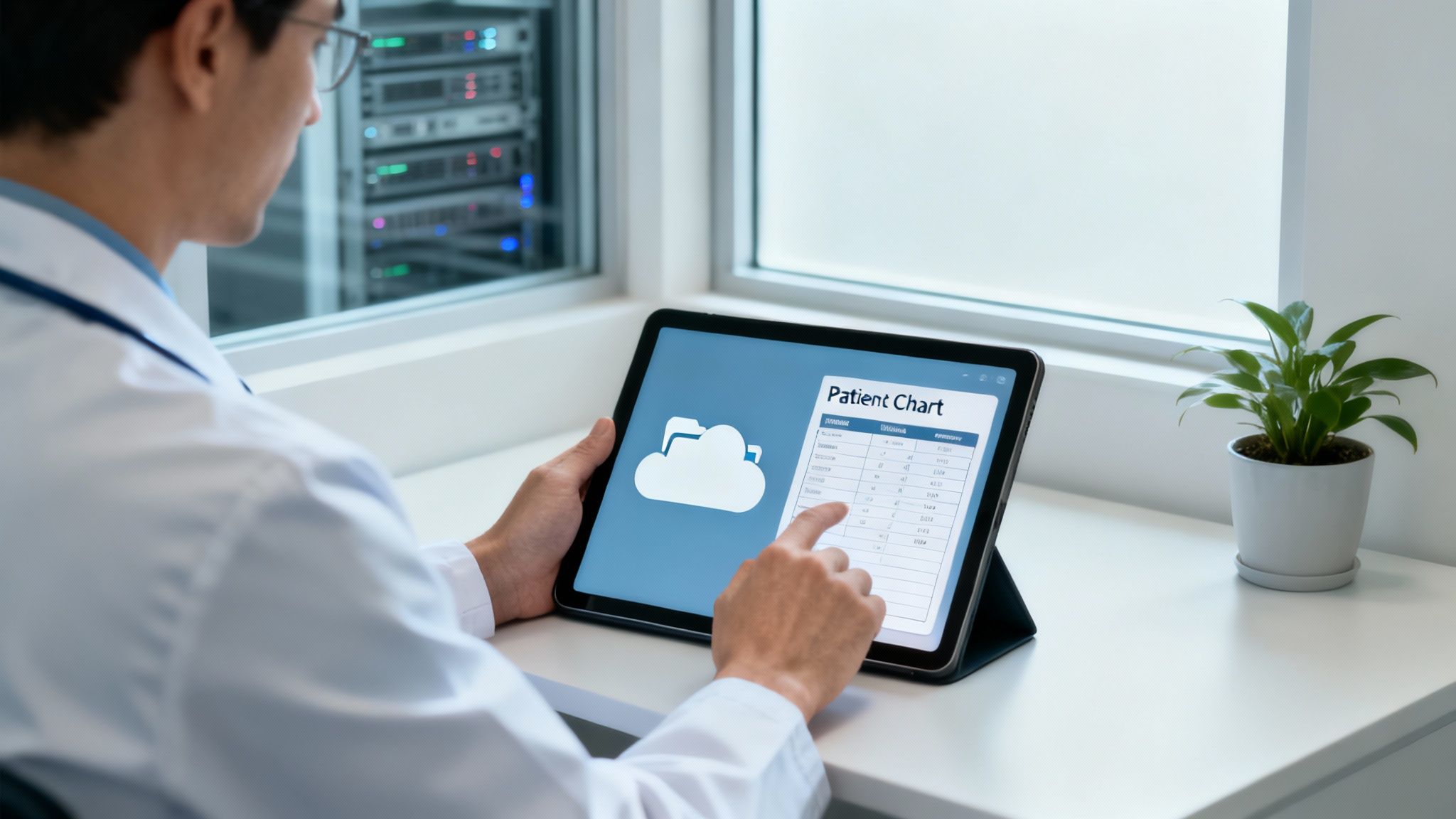
Let's look back at the old way of doing things: the on-premise EMR. This was like having a giant, physical library right inside your practice. You were responsible for everything—buying the servers (the bookshelves), managing the data (the book collection), and hiring a dedicated IT team (the librarians) to keep it all running. It was costly, took up physical space, and if something went wrong, the headache and the bill were all yours.
A cloud based EMR turns that entire model on its head. It’s much more like having a city-wide digital library service at your fingertips. Your practice's invaluable patient data is no longer sitting on a single, vulnerable server in a closet. Instead, it’s stored securely in professional data centers with bank-level security, managed 24/7 by experts dedicated to protecting that information.
The Shift from Ownership to Access
This move from owning the hardware to simply accessing the service is the new normal in healthcare tech. It’s not just a passing trend; it's a strategic decision that levels the playing field for practices of all sizes. The numbers don't lie: cloud systems now dominate with a 55.90% share of the total EMR market. What's more, this segment is expected to grow at a healthy 5.67% CAGR through 2031, easily outpacing the rest of the market. You can dig deeper into the EMR market's evolution over at Mordor Intelligence.
This model removes the heavy burden of IT management, freeing up clinicians and staff to focus on what truly matters: patient care. It makes powerful, enterprise-grade technology accessible to smaller practices that could never have afforded it in the past.
On-Premise EMR vs Cloud Based EMR at a Glance
To really see the difference, it helps to put the two models side-by-side. The table below breaks down the fundamental contrast between the old way and the modern approach.
| Feature | On-Premise EMR (The Old Way) | Cloud Based EMR (The Modern Way) |
|---|---|---|
| Initial Cost | Very high (servers, software licenses, IT setup) | Low (setup fee + first subscription payment) |
| Data Location | On a physical server in your office | On secure, remote servers run by the vendor |
| Accessibility | Limited to office network, remote access is complex | Anywhere with an internet connection, on any device |
| Maintenance | Your responsibility (updates, security, repairs) | Handled entirely by the vendor |
| Security | Your responsibility to manage and fund | Managed by security experts with advanced tools |
| Scalability | Difficult and expensive (requires new hardware) | Easy and instant (adjust your subscription plan) |
As you can see, the cloud model offloads nearly all the technical and financial burdens that came with traditional systems, allowing you to be more agile and patient-focused.
Core Advantages of a Cloud System
The benefits become obvious almost immediately, particularly for specialized practices like medspas, direct primary care, and concierge medicine. Here are the core advantages driving so many to make the switch:
- Anywhere, Anytime Access: Check patient charts, manage your schedule, and handle billing from any device with an internet connection. You're no longer tethered to the office.
- Lower Upfront Costs: You can forget about the massive capital investment in servers and IT infrastructure. It’s replaced by a predictable, operational expense—a simple monthly or annual subscription fee.
- Reduced IT Burden: The vendor takes care of all software updates, security patches, and server maintenance behind the scenes. No more panicked calls to an IT consultant or weekend software installs. You can learn more about the nuances between different EMR systems on our blog.
What You Really Gain by Moving Your Practice to the Cloud
Moving to a cloud-based EMR is so much more than a simple software update. It's a fundamental shift in how your practice works, grows, and cares for patients. You’re essentially cutting the cord from clunky, expensive physical hardware and stepping into a more dynamic, flexible, and financially sensible way of operating.
This isn't just about accessing records online. It’s about building a practice that's more resilient and ready for the future.
The first thing you'll notice is the impact on your wallet. Traditional, on-premise systems required a huge upfront investment in servers, networking gear, and the IT staff to manage it all. That kind of capital outlay was a massive barrier for smaller or growing practices.
A cloud-based EMR completely flips that script. The cost model moves from a massive, unpredictable capital expense (CapEx) to a stable, predictable operational expense (OpEx). You just pay a subscription fee, usually monthly or annually, like you do for any other service. This makes budgeting a breeze and puts top-tier technology within reach for any practice, no matter its size.
A New Level of Freedom and Flexibility
Beyond the budget, the day-to-day operational benefits are huge. Remember having to schedule downtime for software updates or security patches? Those days are over. With a cloud system, the EMR vendor handles all the maintenance and upgrades automatically, behind the scenes. Your system is always current, always secure, and you don't have to lift a finger.
This frees up your team from being part-time IT support and lets them focus on what they do best: taking care of patients. Clinicians can work with confidence, knowing their tools have the latest features and meet all compliance standards without any extra effort. It’s a key reason practices look into modern technology solutions for healthcare to make their daily workflows smoother.
Think about what this looks like in the real world:
- For a growing medspa: Opening a second location is suddenly straightforward. You don't need to build a whole new IT closet. New staff can log in and securely access the EMR from day one with nothing more than an internet connection.
- For a primary care clinic: A provider can securely check patient charts, answer messages, or refill prescriptions from home after hours. This kind of flexibility is a game-changer for reducing burnout and being more responsive to patient needs.
- For a concierge practice: A doctor can pull up a patient's complete history on a tablet during a house call, delivering the exact same quality of care as they would in the clinic.
A cloud-based EMR gives your practice the agility to adapt. It grants your team the freedom to work securely from anywhere, on any device, effectively tearing down the physical walls of the old-school clinic.
Designed to Grow With You
Your practice isn’t standing still. You add new providers, launch new services, and maybe even expand to new cities. Your technology has to keep up. With on-premise systems, growth is often a painful and expensive process involving new hardware and complex IT projects.
A cloud-based EMR, on the other hand, scales effortlessly. Need to add a new user? It's usually as simple as updating your subscription. This nimbleness lets you jump on opportunities without being bogged down by your tech.
What’s more, cloud platforms are built for collaboration. Everyone is working from the same single source of truth, so you can say goodbye to data silos and version-control headaches. A provider at one clinic can instantly see the notes from a specialist across town, ensuring smooth continuity of care. This connected environment helps your team make better decisions, reduces errors, and fosters a truly collaborative spirit.
Decoding HIPAA Security in a Cloud Environment

In healthcare, data security is more than just a feature—it's the bedrock of the trust you build with your patients. One of the most common myths I hear about a cloud based emr is that it's somehow less secure than that server humming away in your office closet. Let's be clear: that’s just not true.
Here’s a simple analogy. Is your cash safer in a flimsy home safe or in a commercial bank vault? Your home safe is close by, sure, but a bank brings professional-grade security to the table—guards, cameras, reinforced steel, and insurance—that you could never replicate on your own. Reputable cloud EMR vendors are the bank vaults for your patient data.
These companies invest millions in dedicated cybersecurity teams, constant monitoring, and sophisticated threat detection. Their entire business hinges on protecting your information, so they deploy enterprise-level security measures that are simply out of reach for the average private practice.
The Layers of Cloud Security
Real security isn't a single lock on a door; it's a series of defenses built one on top of the other. A top-tier cloud EMR provider doesn’t just put up a firewall—they build a fortress around your data. Once you understand these layers, it's easier to see how Protected Health Information (PHI) stays safe in the cloud.
Here are the non-negotiable security protocols you should look for:
- Data Encryption at Rest: This is a fancy way of saying that when your data is just sitting on a server, it's completely scrambled. If a thief somehow managed to physically steal the hard drive, the patient files would be nothing but unreadable code without the specific decryption key.
- Data Encryption in Transit: When you pull up a patient chart on your laptop or tablet, that data is also encrypted as it travels across the internet. This stops hackers from intercepting the information as it moves between your device and the cloud.
- Multi-Factor Authentication (MFA): You already use this for your online banking. MFA demands more than just a password to get in, usually a one-time code sent to your phone. It’s a simple step, but it’s one of the most powerful ways to block unauthorized access, even if a staff member’s password gets stolen.
These technical safeguards are just one piece of the puzzle. Cloud vendors also handle 24/7 system monitoring, create redundant backups, and have disaster recovery plans ready to go. This creates a level of security that's almost impossible for a single practice to manage on its own. To even attempt it, clinics often need specialized medical practice IT support, which is another major responsibility a cloud EMR vendor handles for you.
A common misconception is that physical possession of a server equals control. In reality, a professionally managed cloud environment provides far greater control over data access, auditing, and threat prevention.
The Business Associate Agreement (BAA)
Beyond all the tech, there's a crucial legal document you absolutely must have: the Business Associate Agreement (BAA). This isn't just a suggestion; it's a legally binding contract mandated by HIPAA. The BAA makes your cloud vendor just as responsible for protecting patient data as you are.
The BAA legally forces the vendor to implement all required HIPAA safeguards and to report any security incidents or potential breaches to you. If a vendor won't sign a BAA, stop the conversation right there—they aren't a serious or compliant player in the healthcare space. This document is your ultimate legal assurance that they are a true partner in keeping you compliant.
Building a Connected Practice with Integrated Systems
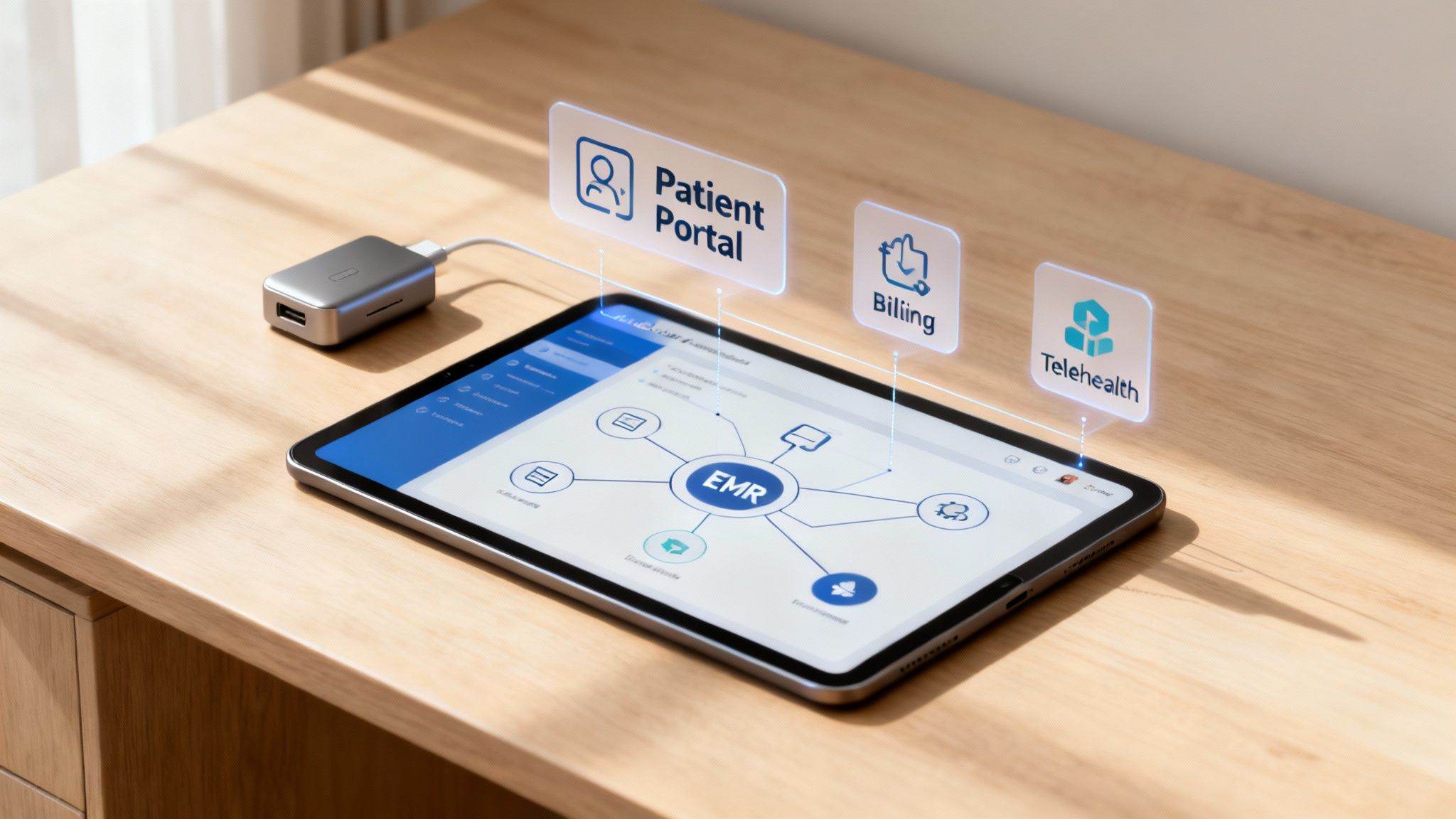
A modern EMR should be the central nervous system of your practice, not an isolated island of data. The true power of a cloud-based EMR is only unlocked when it connects seamlessly with the other tools you depend on every day, creating a single, unified command center for your entire operation.
For far too long, practices have been stuck juggling a patchwork of disconnected vendors—one for scheduling, another for billing, and a third for patient communication. This approach creates constant friction, walls off critical data, and leads to endless administrative headaches. Every time information has to move from one system to another, it requires someone to type it in by hand, which wastes time and opens the door to costly mistakes.
This fragmented model is a major drag on any growing practice. It grinds workflows to a halt, makes accurate reporting nearly impossible, and ultimately frustrates both your staff and your patients. Think about it: a patient books an appointment online, only for your front desk to have to manually re-enter everything into the EMR. That's exactly the kind of inefficiency an integrated system is built to solve.
The Power of APIs: Your Universal Adapter
So, how does a cloud-based EMR talk to all your other software? The magic happens through something called an Application Programming Interface, or API.
It's helpful to think of an API as a universal adapter. Just like you need a specific plug to use an American hairdryer in a European outlet, software systems need APIs to communicate with each other. A well-designed API gives your EMR a standardized, secure way to send and receive data from other platforms automatically.
This is what turns your EMR from a simple digital filing cabinet into a dynamic hub for your whole practice. It stops being a closed-off system and becomes the core that connects every moving part, ensuring information flows exactly where it needs to go without anyone lifting a finger.
Creating a Seamless Ecosystem in Practice
When your EMR is fully integrated with your other tools, the benefits show up in every corner of your practice. The goal is to build a system where every component works in harmony, creating a smooth, effortless experience for everyone.
Here’s what this looks like in the real world:
- For a Medspa: A client books a "laser genesis" package on your website. That appointment instantly populates the EMR schedule, creates a new patient record (or updates an existing one), and even queues up the right billing codes for when the service is complete.
- For a Primary Care Clinic: A physician orders lab work directly from the patient's chart. The order is sent electronically to the lab. When the results are ready, they're automatically sent back, attached to the correct patient file, and a notification pings the doctor to review them.
- For a Concierge Practice: The EMR integrates directly with your telehealth platform. A provider can launch a video call right from the EMR, with all the patient's information right there on the screen. Afterward, a summary of the visit is automatically saved to the patient's chart.
A connected ecosystem eliminates the manual busywork that burns out your staff. It ensures data is consistent and up-to-date across all platforms, which leads to better clinical decisions, more efficient billing, and a far superior patient experience.
This integrated approach is the foundation of modern healthcare. The connected healthcare ecosystem, valued at USD 16.54 billion, is dominated by cloud EMR platforms, which command 36.26% of the market share. As this market grows toward a projected USD 28.22 billion by 2033, the EMR's role as the central data hub connecting telehealth, wearables, and analytics will only become more critical. You can explore more on this in the connected healthcare platform market report from Grand View Research.
Ultimately, choosing a cloud-based EMR with robust integration capabilities is about more than just convenience. It’s a strategic decision to build a more efficient, resilient, and patient-focused practice that’s ready for whatever comes next.
How to Choose the Right EMR for Your Specialty
Choosing a new Electronic Medical Record system isn't like picking out a new printer. It’s a lot more like choosing a long-term business partner. The right EMR should feel like a natural extension of your practice, one that gets your unique rhythm and workflow, not some generic software that forces you to change how you work.
A one-size-fits-all approach just doesn't cut it in healthcare anymore. The charting, billing, and patient communication needs of a high-volume medspa are worlds apart from those of a relationship-focused concierge clinic. That’s why you have to start the selection process with your specialty and work your way out from there.
Define Your Core Workflows First
Before you even book a single demo, sit down and map out your most critical daily tasks. Don't think in terms of software features; think in terms of real-world actions. How do you handle a new patient intake? What are the exact steps from the moment a patient walks in the door to the claim being sent out?
- For a Medspa: Your list might include things like photo management for before-and-afters, tracking injectable lot numbers, managing treatment packages, and selling retail products from the front desk.
- For a Concierge Clinic: You'll likely prioritize things like secure messaging for direct patient access, tools for managing different membership tiers, and detailed tracking of personalized wellness plans.
This workflow-first approach becomes your compass. It keeps you focused on what actually matters for your practice's efficiency and patient care, stopping you from getting sidetracked by flashy features you’ll never end up using.
Key Evaluation Criteria Beyond the Feature List
Once you have your core workflows defined, you can start looking at potential EMR partners. It's so important to look past the marketing promises and get into the practical realities of using the system every single day. Here’s a checklist of what you should be looking for.
- Specialty-Specific Design: Does the EMR have templates, forms, and workflows built specifically for your field? A system designed for general practice will feel clunky and inefficient for an aesthetic medicine clinic that needs specific consent forms and visual charting tools.
- User Interface (UI) and Experience (UX): Is the system actually intuitive? During a demo, pay close attention to how many clicks it takes to complete a common task. A clean, logical interface means less time spent on staff training and less daily frustration for your team.
- Customer Support Quality: What happens when something goes wrong? Look for vendors that offer dedicated support with real people who understand healthcare. Check reviews and ask for references to see how responsive and knowledgeable they really are.
- Pricing Transparency: A low monthly fee can be very deceiving if it doesn't include implementation, training, data migration, and ongoing support. Demand a clear, all-inclusive pricing structure so you can avoid costly surprises down the road.
- Integration Capability: Does the EMR connect smoothly with your other essential tools, like your patient portal, billing software, and marketing platforms? A truly integrated cloud based emr gets rid of data silos and automates all those little routine tasks.
The Financial and Operational Case for Specialization
Choosing a specialty-specific cloud EMR isn't just about making life easier; it's a solid financial decision. You can see this trend in the hospital EHR market, where the cloud segment is dominant because it’s scalable and cost-effective. Subscription pricing gets rid of huge upfront capital expenses, a model that’s perfect for specialty practices that don't have the budget for an on-premise server room. This market is projected to grow from USD 18.35 billion to USD 29.33 billion by 2034, and you can find more insights on the hospital electronic health records market over at Nova One Advisor.
An EMR that lines up with your specialty cuts down on the need for expensive customizations and clunky workarounds. It minimizes staff training time, reduces billing errors, and ultimately lets your team see more patients and deliver better care—the most direct path to a stronger ROI.
For a partner like Ragnar STACK, this specialty-first thinking is built into the platform's DNA. By offering a vertically integrated ecosystem for fields like medspas and concierge medicine, every tool—from booking to billing—is designed to work together from the start, removing the complexity that holds so many practices back. This approach makes sure the technology serves you, not the other way around.
A Step-by-Step Plan for EMR Implementation and Data Migration
Switching your EMR system can feel like performing open-heart surgery on your practice's operations. Let's be honest, it's a big deal. But with a clear, structured roadmap, it becomes a manageable process instead of a disruptive one. A successful move to a cloud-based EMR really comes down to smart planning and careful execution.
This isn't just about installing new software; it's a chance to fundamentally improve your workflows for the better. Think of it as a guided journey, not a leap of faith. With the right partner, you can turn a potentially stressful change into a strategic evolution for your entire practice.
Phase 1: Understanding Your Current Workflows
The first step has nothing to do with technology. It’s all about a deep, honest look at how your team actually works day-to-day. Before you can build a better future, you need a perfect blueprint of the present. This means mapping out every critical process in your clinic.
Get your team together—from the front desk to the clinicians—and walk through their daily tasks. How are appointments scheduled? What’s the patient intake process look like? How are claims filed and followed up on? Pinpointing the friction points and inefficiencies now is the key to configuring the new system to solve those exact problems later.
Phase 2: Secure Data Migration
This is often the most feared part of the process, but it doesn't have to be. Think of data migration like moving to a new, better-organized house. You wouldn’t just throw everything into boxes at random. You'd sort, label, and probably get rid of some junk first. A skilled migration team does the exact same thing for your patient data.
The process usually breaks down into these critical steps:
- Extraction: Securely pulling all patient demographic, clinical, and billing data from your old system.
- Cleansing: This is the "clean-up" phase. Data is standardized, duplicates are merged, and formatting errors are fixed to ensure everything is accurate and ready for the new system.
- Mapping: Carefully matching the old data fields to the correct new fields in the cloud-based EMR. This is crucial for making sure nothing gets lost in translation.
- Validation: Running test imports and having your team review the data to confirm everything has moved over correctly before the final switch is flipped.
A common pitfall is having fuzzy data migration goals. Work with your vendor to define exactly what needs to be moved—like the last three years of patient records—to keep the process focused and efficient.
Phase 3: Customization and Training
Your new EMR should adapt to you, not the other way around. This phase is all about tailoring the system to fit the unique workflows you mapped out back in Phase 1. For a medspa, this might mean creating specialty-specific templates. For a concierge practice, it could involve setting up unique billing rules.
Once the system is configured, comprehensive training is non-negotiable. Don't gloss over this step; a staggering 73% of implementation failures are tied to poor user adoption. Effective training is more than a one-off webinar. It should be role-specific, hands-on, and backed by ongoing resources. You can dive deeper into what goes into great healthcare practice management software on our blog.
The final stage is the "go-live." A good partner provides on-site or dedicated remote support during this critical period to squash any bugs, answer questions, and ensure your team feels confident from day one. That hands-on support is what turns a launch into a smooth and successful transition.
Common Questions About Cloud-Based EMR Systems
Even when you're sold on the benefits, it's completely normal to have a few nagging questions before making a big change. Let's tackle some of the most common concerns practice owners raise when they're thinking about moving to a cloud-based EMR.
How Much Does a Cloud-Based EMR Typically Cost?
The biggest difference from old-school, on-premise systems is the payment model. Instead of a massive upfront cost for servers and software licenses, cloud-based EMRs work on a subscription basis, usually priced per provider, per month. This is often called a Software-as-a-Service (SaaS) model.
This approach makes budgeting much simpler. You have a predictable monthly expense that can easily grow with your practice, rather than a huge capital investment. Just be sure to find a vendor with transparent pricing that spells out what's included—things like implementation, data migration, training, and support shouldn't come as a surprise later.
Is My Patient Data Truly Secure in the Cloud?
This is a big one, and the answer is yes—with the right vendor, your data is likely much safer than it would be on a server tucked away in your office closet. Reputable providers use enterprise-level security measures that are simply out of reach for most private practices. We're talking about advanced data encryption, physically secure data centers with round-the-clock monitoring, and sophisticated access controls.
The non-negotiable here is a Business Associate Agreement (BAA). This is a legal contract that holds your EMR vendor accountable for protecting patient data according to strict HIPAA standards. If a vendor won't sign a BAA, walk away.
What Happens If Our Internet Connection Goes Down?
It's a valid concern. While you do need an internet connection for live access, it's not the single point of failure it used to be. Many modern EMRs have contingency plans, like offline modes that let you view schedules or look at cached patient information.
For peace of mind, it’s also just good practice to have a simple backup, like a mobile hotspot. But honestly, with the reliability of business internet today and the 99.9%+ uptime guarantees most top-tier EMR providers offer, the chances of a prolonged outage crippling your practice are incredibly slim.
How Difficult Is Migrating Our Existing Patient Data?
Data migration sounds intimidating, but a good EMR partner shoulder's most of the heavy lifting. The complexity really depends on where your data is coming from (your old system) and how clean it is.
The whole process is a well-defined project. It starts with analyzing your current data, then moves into a carefully managed migration and wraps up with training your team.
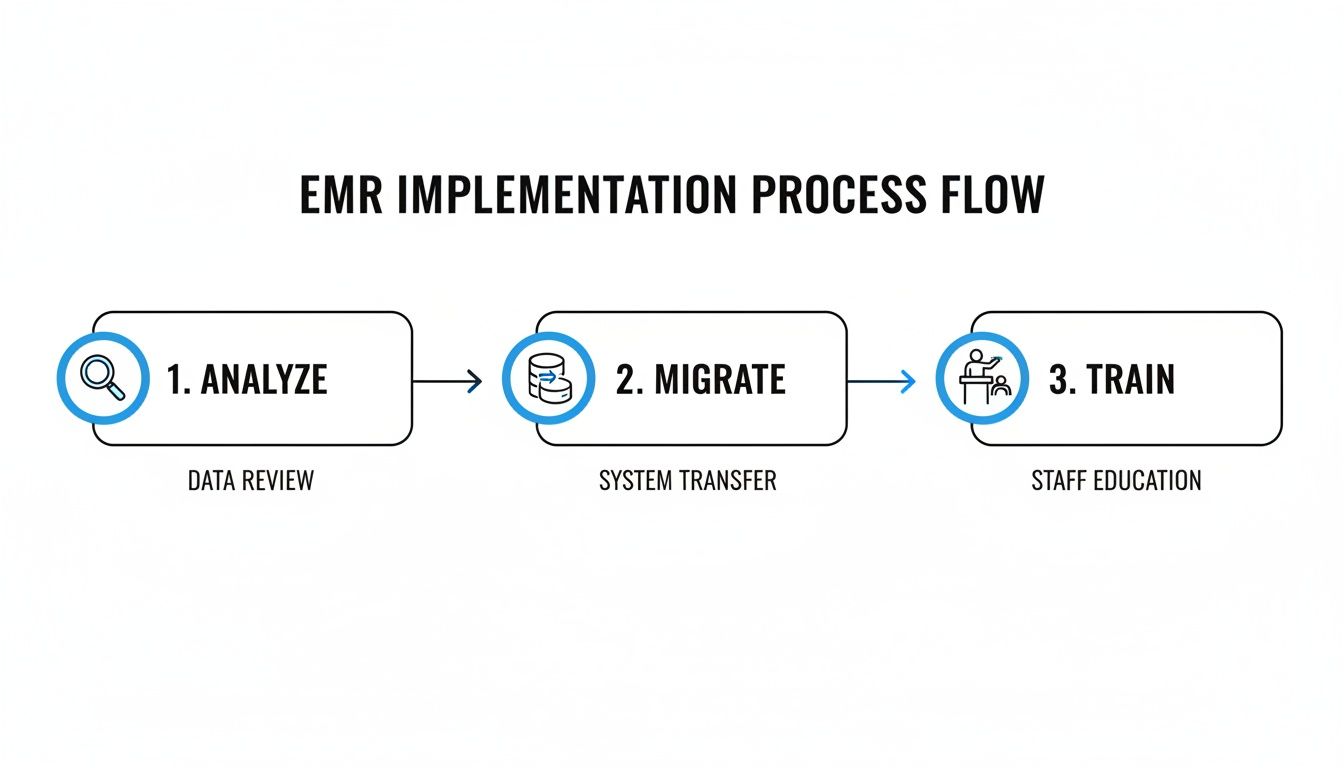
A quality vendor will have a dedicated team to handle the secure extraction of your records, clean them up (fixing formatting, getting rid of duplicates), and then carefully import everything into the new system. Their job is to make the switch as smooth as possible for you.
At Ragnar STACK, we eliminate the complexity of running a modern practice with a vertically integrated technology ecosystem built for operational excellence. See how our platform can unify your workflows by visiting us at https://notes.rstack.io.
Share This Story, Choose Your Platform!
LISTEN NOW
CAPTIVATING READS
Our blog is packed with articles and stories based around lifestyle, business, design and wellbeing. Subscribe now to get all of our updated directly to your inbox every week.