
When we talk about specialized IT support for a medical practice, we're talking about much more than just fixing computers. It's the complete, strategic oversight of your clinic's entire technology ecosystem—from the EMR software you rely on every minute to the complex cybersecurity measures that keep patient data safe.
This isn't an optional expense you can push off until next quarter. Think of it as a core investment in the operational health, security, and future of your practice.
Why Your Practice Needs Specialized IT Support
Running the tech for a healthcare practice is a world away from managing IT for a law firm or a retail store. It’s not just about keeping the Wi-Fi on or the printers working. It’s about protecting patient lives, guaranteeing the integrity of critical health data, and staying on the right side of a dizzying maze of regulations.
Your IT infrastructure is the digital circulatory system of your clinic. It’s the invisible network connecting every vital function, from the moment a patient checks in at the front desk to their final billing and follow-up appointment.
If that system is sluggish, unreliable, or insecure, the whole practice grinds to a halt. A generic IT provider might be great at troubleshooting a laptop, but they simply don't have the specific experience needed for healthcare. They don’t live and breathe the unique challenges of your world.
Beyond Reactive Fixes to Proactive Strategy
Too many practices fall into the trap of viewing IT as a purely reactive service—you only call them when something is already broken. This "break-fix" model is not just inefficient; in a medical setting, it's downright dangerous. A proactive approach, on the other hand, is about getting ahead of problems before they can ever impact patient care.
What does that look like in practice?
- Constant Monitoring: Someone is always watching your network performance, server health, and for any signs of a security threat, 24/7.
- Preventative Maintenance: This means regularly updating software, patching security holes as soon as they're found, and fine-tuning your systems to prevent slowdowns and crashes.
- Strategic Planning: Your IT partner should be helping you align your technology with your practice's growth. Are you adding telehealth services? Integrating a new EMR module? Your tech needs to be ready for what's next.
A proactive IT posture is about building resilience. It ensures that a minor technical issue doesn’t cascade into a clinical crisis, protecting both your patients and your practice's reputation.
The Critical Role of Compliance and Security
Let’s be clear: HIPAA isn't a guideline. It's a federal law with steep, practice-crippling penalties for violations. Specialized IT support is what puts the technical safeguards in place to protect electronic protected health information (ePHI). This includes everything from powerful firewalls and end-to-end data encryption to secure access controls and the detailed audit logs you’ll need to prove your diligence.
The money flowing into healthcare technology tells the story. The global healthcare IT market hit $420.23 billion in 2024 and is expected to rocket to $961.26 billion by 2030. This explosive growth is driven by one thing: the urgent need for secure, reliable digital systems. You can learn more about these healthcare IT market trends to see where the industry is heading.
This all points to a simple truth: having a dedicated partner for your medical practice IT support is no longer a luxury. It’s a fundamental requirement for delivering modern healthcare.
What Goes Into Healthcare IT Services?
To really get a handle on your practice’s tech needs, you first have to understand what makes up comprehensive IT support. It’s not just one thing; it’s a whole suite of services that work together to keep your clinic secure, efficient, and running without a hitch.
Think of it like the different departments in a hospital. Each one has a specific job, but they all need to communicate and work in concert to ensure the best patient outcomes. Your IT is no different. Let’s pull back the curtain on the essential pillars you should expect from any IT partner worth their salt.
Managed IT Services: Your Proactive Foundation
Imagine having a dedicated technology department that’s always one step ahead. That’s the essence of managed IT services. Instead of just reacting when a computer breaks or a server goes down, their entire job is to stop those problems from ever happening. This proactive mindset is the bedrock of modern medical practice IT support.
This isn't about calling for help after the fact. It’s about constant, behind-the-scenes maintenance to keep your entire digital infrastructure healthy and stable, moving you away from the chaotic "break-fix" cycle.
Here's what that looks like in practice:
- 24/7 Network Monitoring: They're always watching. Your IT provider keeps a close eye on your network for any red flags, whether it’s suspicious traffic hinting at a cyberattack or a server running dangerously hot.
- Preventative Maintenance: This means regularly applying software patches, running system updates, and checking on hardware health. It’s all about fixing tiny issues before they can escalate into major downtime.
- Helpdesk Support: When your staff does hit a snag—maybe they can't access the EMR or a printer just won't cooperate—they get immediate access to an expert who can solve the problem fast and let them get back to their work.
Managed IT services turn your technology from an unpredictable liability into a reliable asset. It’s the difference between having a mechanic perform regular maintenance on your car and only calling a tow truck after you’re already stranded on the side of the road.
Cybersecurity: The Non-Negotiable Shield
In a medical setting, cybersecurity isn’t just an IT issue—it's a patient safety issue. A single data breach can spiral into a nightmare of massive fines, a ruined reputation, and a catastrophic loss of patient trust that’s nearly impossible to win back.
A healthcare-focused IT partner brings a multi-layered security strategy to the table, one built specifically for the unique threats and compliance demands of a medical practice. This is about so much more than just installing some antivirus software and calling it a day.
Data Backup and Disaster Recovery
Let’s be honest: what would you do if your clinic was crippled by a ransomware attack tomorrow? Or if a server failure wiped out your patient records? A solid data backup and disaster recovery (BDR) plan is the insurance policy that lets you sleep at night. It ensures that even in a worst-case scenario, you can get your critical data back and open your doors again.
A proper BDR strategy isn't optional. It must include:
- Regular, Automated Backups: Your patient charts, EMR data, and billing records should be backed up automatically and frequently to a secure, off-site location.
- Redundancy: Smart plans store your data in multiple locations. This way, a single point of failure (like a fire at your office) can't destroy your only backup.
- Rapid Recovery Protocols: Your IT provider needs a clear, tested playbook for restoring your systems from the most recent clean backup. This is what shrinks downtime from days or weeks to just a few hours.
EMR and Practice Management Support
Your Electronic Medical Record (EMR) system is the clinical heart of your practice. It has to work, period. Specialized IT support makes sure it runs smoothly and integrates properly with all your other software. When your team can pull up charts, schedule appointments, and process billing without fighting the technology, your entire practice runs better.
This is a critical piece of the puzzle. For a deeper look, check out our guide on choosing the right healthcare practice management software. Getting this support right is how you get the most out of your most important clinical tool.
Getting HIPAA IT Compliance Right
Navigating the Health Insurance Portability and Accountability Act (HIPAA) can feel like trying to solve a puzzle with a thousand tiny pieces. For any medical practice, compliance isn't just about having policies tucked away in a binder; it’s about the real-world technical safeguards that protect patient data, minute by minute. One wrong move doesn’t just mean a hefty fine—it can completely erode the trust you've built with your patients.
Think of your IT system as the digital vault safeguarding your patients' most sensitive information, their electronic Protected Health Information (ePHI). HIPAA doesn't just tell you to build a vault; it gives you the blueprints. Your medical practice IT support provider is the one who has to actually build it, making sure every digital lock and key is in the right place and works perfectly.
Breaking Down the HIPAA Security Rule
The part of HIPAA that gets deep into technology is the Security Rule. It lays out the specific protections required to maintain the confidentiality, integrity, and availability of all ePHI. This isn't just legalese—it's a practical checklist for your network, servers, and every device that touches patient data.
The rule is organized into three main types of safeguards:
- Technical Safeguards: This is the tech itself—the software and policies you use to protect ePHI and control who gets to see it. Think data encryption and mandatory password policies.
- Physical Safeguards: This covers the physical security of your equipment. It’s about things like locked server rooms and making sure computer screens aren't visible to people in the waiting room.
- Administrative Safeguards: These are the human-focused policies and procedures, like conducting risk assessments, training your staff on security, and having a disaster recovery plan.
A good IT partner will obsess over the technical safeguards, because that’s where most practices are unknowingly exposed. They don't just aim to meet the bare minimum; they build a system designed to stand up to real-world threats.
The real point of HIPAA's technical rules isn't to satisfy a government auditor. It's about creating a truly secure environment where patient data is safe from harm, whether that's a sophisticated cyberattack or a simple human error.
Key Technical Safeguards You Can't Ignore
So, what do these technical safeguards actually look like in your practice? It’s not one single thing, but several layers of defense working together. Your IT team is responsible for putting these in place and keeping them running.
1. Access Control Mechanisms
This is all about making sure people can only see the information they absolutely need to do their jobs. It’s like giving your front-desk staff a key that only opens the scheduling software, while a physician's key opens the EMR. In the IT world, this means giving every single user their own unique login and setting up permissions based on their role.
2. Data Encryption and Decryption
Encryption is basically a secret code for your data. It scrambles information so that if it falls into the wrong hands, it’s completely unreadable without the right key. If a doctor’s laptop is stolen from their car, but the hard drive is encrypted, the patient data on it is still safe. HIPAA mandates encryption for data both "at rest" (sitting on a hard drive) and "in transit" (being sent over a network).
3. Audit Controls and Activity Logs
You have to be able to see who is doing what within your systems. Audit logs are the digital paper trail that tracks every time someone accesses patient data, when they did it, and if they made any changes. If you ever suspect a breach, these logs are the first place you’ll look to figure out what happened. They aren't optional; they're a requirement.
These protections are more than just a good idea; they're the bedrock of trust in modern healthcare. To dig deeper into this, you can find more great info on current trends in healthcare IT that show how compliance and technology are constantly evolving. Getting a handle on these requirements is your first and most critical line of defense.
In-House IT vs. Managed Services for Your Practice
Deciding how to handle your practice's IT is one of the most important strategic calls you'll make. Should you hire a dedicated IT person to work on-site, or is it better to partner with an outside firm? Both have their pros and cons, and the best choice really comes down to your practice's size, budget, and where you see it going in the future.
This isn't just a hypothetical question anymore. As technology becomes more intertwined with patient care, the stakes get higher. In the U.S., healthcare IT spending is on track to reach a staggering $176.6 billion, with a heavy focus on security, cloud systems, and data management. That kind of investment shows just how critical it is to get your IT strategy right. If you want to dig deeper, you can check out these national healthcare IT spending trends to see where the market is headed.
Ultimately, this is about more than just making sure the computers turn on. It's about building a secure, compliant, and efficient backbone for your entire practice.
The In-House IT Approach
There's a definite comfort in having an IT specialist on your payroll. When the EMR locks up right before a patient appointment or the network goes down, having someone just down the hall who can fix it now feels like a lifesaver. Over time, that person learns the ins and outs of your practice—your specific workflows, your staff's tech habits, and all the little quirks of your setup.
But this convenience comes with a lot of hidden costs and risks. The salary for a truly qualified IT pro is just the start. You also have to think about benefits, ongoing training, vacation coverage, and the expensive software and tools they'll need to do their job.
Even more critical is the "single point of failure" problem. What happens if your one IT guru gets the flu, takes a two-week vacation, or finds a new job? Their sudden absence can leave your practice completely vulnerable, with no one who truly understands how everything is wired together.
Relying on a single in-house employee means their knowledge gaps become your practice's vulnerabilities. An expert in network setup may know very little about HIPAA-compliant cloud backups or the latest cybersecurity threats targeting healthcare.
The Managed Services Provider (MSP) Alternative
Working with a managed service provider, or MSP, is a completely different way of thinking. Instead of hiring one person, you're essentially getting an entire team of specialists on-demand for a predictable monthly fee. The whole model is built around giving a smaller practice access to a deep bench of expertise it could never afford to hire full-time.
A healthcare-focused MSP brings a ton of specialized knowledge to the table, particularly in a few key areas:
- Cybersecurity: They have dedicated security professionals who spend their days defending against the exact kinds of cyberattacks that target medical practices.
- Compliance: They live and breathe the technical side of HIPAA, ensuring your systems are configured from the ground up to protect sensitive patient data.
- 24/7 Support: Tech problems don't stick to a 9-to-5 schedule. A good MSP offers round-the-clock monitoring and support to tackle issues whenever they pop up.
- Scalability: As your practice adds more staff or opens a new location, an MSP can easily scale your IT infrastructure to match, without you having to go through a painful hiring process.
This decision tree gives you a good sense of the HIPAA compliance details a quality MSP will handle for you.
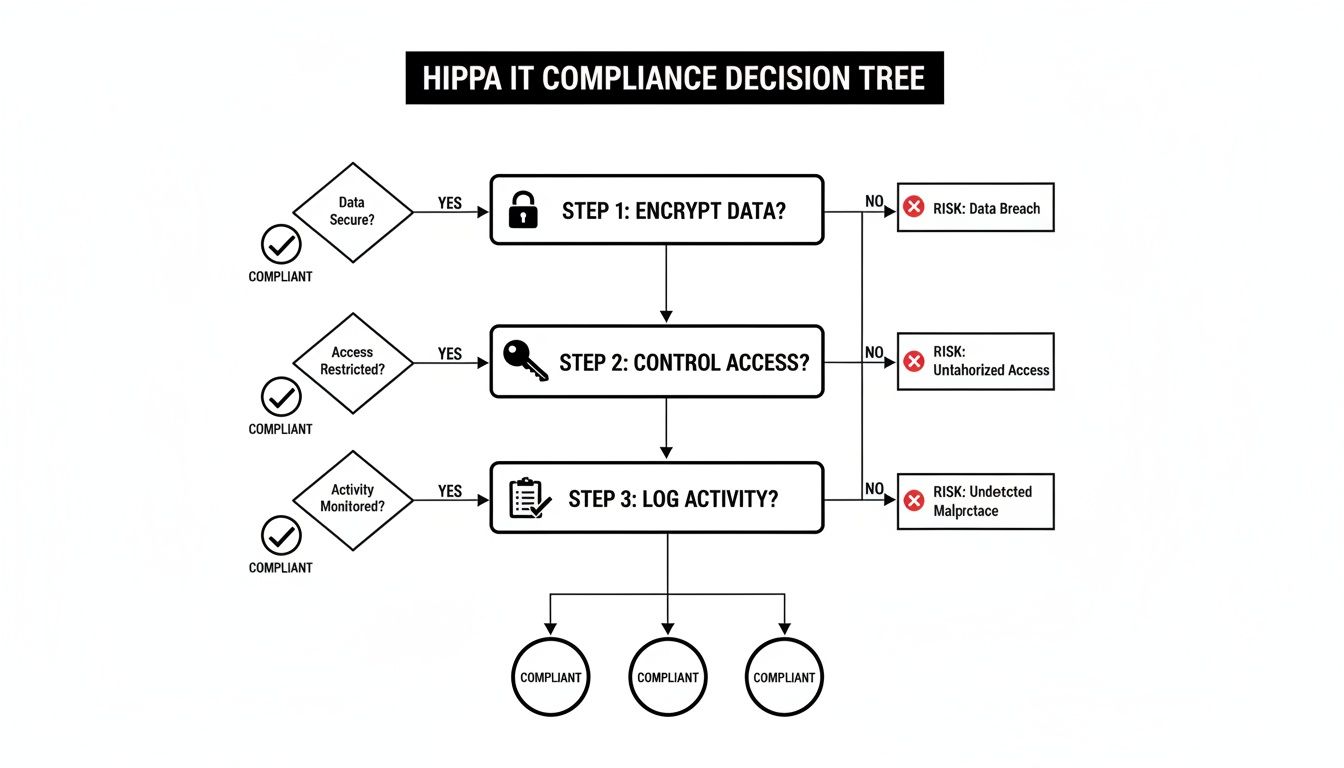
As you can see, it comes down to three non-negotiable pillars of data protection: encrypting information, tightly controlling who can access it, and logging every action taken.
This table helps illustrate the trade-offs at a glance.
Comparing In-House IT vs. Managed IT Support for Medical Practices
| Factor | In-House IT Staff | Managed IT Service Provider (MSP) |
|---|---|---|
| Cost Structure | High fixed costs (salary, benefits, training, tools). Unpredictable project expenses. | Predictable, flat monthly fee. Costs scale with your needs. |
| Expertise | Limited to the knowledge of 1-2 individuals. Gaps in specialized areas are common. | Access to a full team of specialists (security, cloud, compliance, etc.). |
| Availability | Limited to business hours. Vulnerable to sick days, vacations, and employee turnover. | 24/7/365 monitoring and support. Built-in redundancy with a full team. |
| HIPAA Compliance | Responsibility falls entirely on the practice and the in-house staff's knowledge. | Shared responsibility with a partner who has deep, specialized HIPAA expertise. |
| Strategic Focus | Often consumed by daily reactive tasks ("firefighting"). | Proactive management, long-term planning, and strategic guidance. |
| Scalability | Slow and expensive. Requires hiring and training new staff to support growth. | Fast and flexible. Services can be scaled up or down easily as the practice changes. |
At the end of the day, the choice between in-house and managed IT is a classic case of control versus expertise. The in-house model gives you an immediate physical presence, but the MSP model provides a much deeper well of knowledge, security, and resilience. For the vast majority of small to mid-sized medical practices, the comprehensive support and risk reduction offered by a specialized MSP is simply the more strategic and cost-effective path forward.
How to Choose the Right Healthcare IT Partner
Picking an IT provider isn't just a technical decision—it's a strategic one. Think of it this way: the right partner is like an extension of your own team, dedicated to protecting your data, smoothing out your daily operations, and helping your practice grow. The wrong one? They can introduce serious security risks, create constant friction for your staff, and ultimately get in the way of providing great patient care.
Finding a true partner means looking past the slick sales pitch. You need tangible proof that they understand the unique, high-stakes world of healthcare. It’s not enough to be good with computers; they have to get the clinical pressures you and your staff face every single day.
This isn't just a nice-to-have anymore. Digital readiness is a top priority for healthcare leaders. A recent Deloitte study found that approximately 90% of C-suite executives expect their use of digital technologies to speed up, and about 70% of them see technology platforms as a crucial investment. The takeaway is clear: IT is no longer just a cost center, but a strategic asset. You can read more about Deloitte's healthcare outlook here.
Your Vetting Checklist for a Healthcare IT Provider
Before you even book a meeting, you need a shortlist. To even make it onto that list, a potential provider has to check a few non-negotiable boxes. If they can’t demonstrate real competence in these areas, they aren't a serious candidate.
- Verifiable Healthcare Experience: Ask for case studies. Better yet, ask for references from practices that are similar to yours in size and specialty. A provider who spends their days working with law firms just won’t grasp the nuances of EMR systems or the weight of HIPAA compliance.
- Deep HIPAA Knowledge: Don't settle for "we're HIPAA compliant." That's the bare minimum. They need to explain exactly how their services—from data backups to network security—are built to meet and exceed the HIPAA Security Rule.
- A Proactive Security Posture: Security has to be more than just antivirus software and a firewall. Look for a team that offers advanced services like 24/7 network monitoring, threat detection and response, and security awareness training for your employees.
- EMR and PM Software Expertise: This is a big one. Your partner absolutely must have hands-on experience with the specific Electronic Medical Record (EMR) and Practice Management (PM) software you rely on. It’s the only way they can troubleshoot problems efficiently and help you maximize the value of these critical tools. For a closer look, our guide on the best practice management software offers more context.
Critical Questions to Ask Potential IT Partners
Once you have that shortlist, it's time to start asking the tough questions. The answers you get will tell you everything you need to know about their real-world capabilities and whether they truly have a partner mindset.
The point of these questions is to get past the generic sales talk and understand their actual processes. How a provider handles a crisis is the ultimate test of their worth.
Here are a few essential questions designed to cut through the fluff:
"Walk me through your support process during a critical EMR outage."
Listen for a clear, step-by-step plan. A good answer will cover immediate triage, how they'll communicate to keep your staff in the loop, and a defined escalation path to get the problem solved fast."How do you proactively identify and stop cybersecurity threats before they can impact our practice?"
A vague answer about "monitoring" is a red flag. They should be able to name specific tools and methods, like Security Information and Event Management (SIEM) systems, regular vulnerability scanning, and proactive threat hunting."Describe your process for data backup and, more importantly, disaster recovery."
Backing up data is the easy part; restoring it under pressure is what matters. Ask them to talk you through a real recovery scenario. How quickly can they get your systems back online? When was the last time they actually tested this process? Their answer will tell you everything about how prepared they really are.
The Future of Practice Management Is Integrated
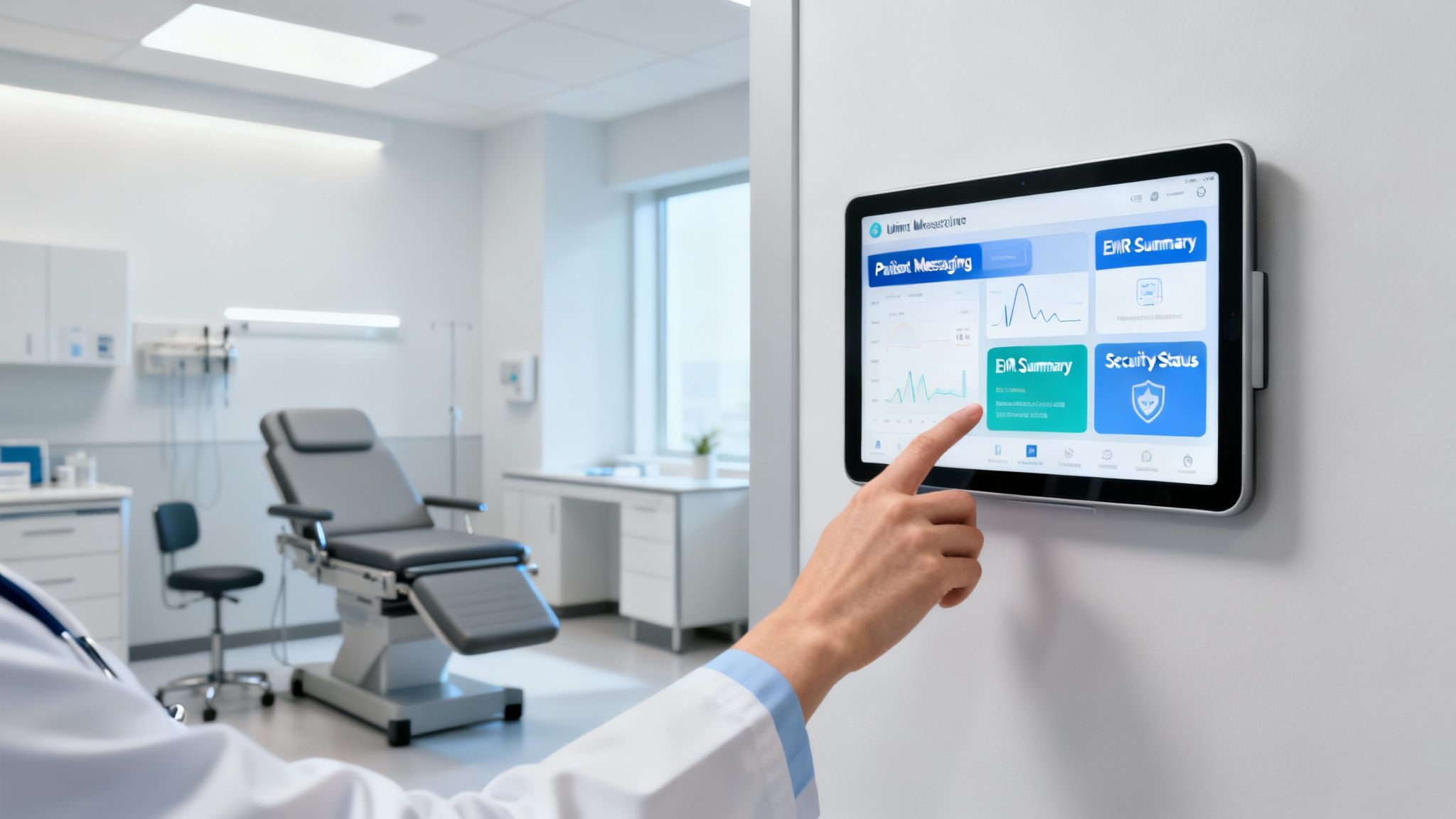
Does running your practice feel like you’re constantly wrangling different vendors? You’ve got one company for your EMR, another for cybersecurity, a separate helpdesk for IT support, and maybe even a fourth for patient communications. Each has its own agenda and its own way of doing things, creating a technology environment that’s more fragmented than functional.
This patchwork approach is a huge source of friction. Integrations are often clunky and unreliable, forcing your staff into manual data entry and creating workflow headaches. When something inevitably breaks, the blame game begins, with each vendor pointing fingers at the others, leaving you stuck in the middle with a problem no one wants to own.
Worse yet, these disconnected systems create security gaps that are nearly impossible to track, exposing your practice to serious compliance risks. All this time spent managing technology is time not spent on what actually matters—providing excellent care to your patients. It's clear the old way of handling medical practice IT support just isn't cutting it anymore.
Shifting from a Toolbox to a Workstation
Think about it this way. Trying to run a practice with multiple IT vendors is like trying to perform a delicate surgery with a jumbled toolbox. You have a dozen different tools, none of which were designed to work together. You spend more time searching for the right instrument than actually focusing on the procedure. That’s the reality for most practices.
Now, imagine a fully equipped surgical suite. Every tool has its place, and every piece of equipment is designed to integrate seamlessly with the others. It’s a complete, purpose-built system designed for efficiency and precision. This is what a vertically integrated platform brings to your practice.
A vertically integrated platform isn't just a bundle of services. It's a single, unified ecosystem where your IT support, cybersecurity, EMR, and communications are all built from the ground up to operate as a single, cohesive unit.
This model gets rid of the friction and risk that come with juggling a dozen different vendors. It replaces chaos with a coherent, well-oiled machine.
How a Single Ecosystem Creates Harmony
When all your technology lives under one roof, the benefits are immediate. Instead of trying to force systems to talk to each other, you get seamless data flow and workflows that just work. This has a massive impact on your practice’s day-to-day operations.
- Strengthened Security: With one provider managing the entire stack, there are no cracks for threats to slip through. Compliance is managed centrally, and audit trails are unified, making it far simpler to maintain and prove HIPAA adherence.
- Streamlined Workflows: Patient data from your EMR can flow directly into your communication tools without needing fragile, third-party integrations. This means your team spends less time fighting with software and more time focused on patients. The details of EHR integration really highlight how crucial this seamless information flow is.
- Simplified Support: When there’s an issue, you have one number to call. That’s it. The finger-pointing vanishes, and you get a single point of accountability. This means faster resolutions and less downtime for your practice.
Moving to an integrated platform isn't just about convenience. It’s a strategic decision to build a more resilient, secure, and efficient foundation for your practice, freeing you and your team to focus on what you do best: caring for patients.
Answering Your Top Questions About Medical IT Support
Even with a good grasp of the basics, you probably have a few specific questions about how all this applies to your practice. That's completely normal. Let's tackle some of the most common questions we hear from practice owners and managers to help you move forward with confidence.
How Much Should Our Practice Budget for IT Services?
There’s no one-size-fits-all answer here, but a good rule of thumb is to budget between 3% and 6% of your practice's annual revenue for quality IT support. Where you land in that range depends on a few things: the size of your practice, how many locations you have, the complexity of your EMR, and how robust you need your cybersecurity to be.
Think of it less as an expense and more as an investment in your practice's stability and security. A small, single-location clinic will likely be on the lower end. A large, multi-specialty group with advanced imaging and telehealth services? You’ll probably want to budget closer to the higher end to keep everything running smoothly and securely.
The question isn't just, "What does IT cost?" It's really, "What's the cost of IT failure?" When you factor in potential downtime, HIPAA fines from a data breach, and the damage to your reputation, proactive IT spending starts to look like a very smart investment.
What Is the First Step to Improve Our Cybersecurity?
If you do only one thing, make it this: get a professional third-party security risk assessment. You can't fix vulnerabilities you don't even know exist. This assessment is like a full diagnostic workup for your practice's digital health, pinpointing weak spots in your network, devices, software, and even employee habits.
A seasoned expert will measure your systems against current HIPAA requirements and known cyber threats, giving you a prioritized roadmap for what needs to be fixed first. This takes you from reactive guesswork to a proactive, data-driven security strategy, ensuring you’re putting your resources where they’ll have the most impact.
How Long Does It Take to Switch IT Providers?
Making a switch to a new managed IT provider isn't an overnight flip of a switch—and that's a good thing. A carefully planned transition typically takes anywhere from 30 to 90 days. The exact timeline depends on the complexity of your current setup, like the number of users, servers, and office locations you have. A smooth handover is always done in phases to keep disruptions to your daily operations at an absolute minimum.
Here’s what that process usually looks like:
- Discovery and Planning: Your new provider gets under the hood to audit your existing infrastructure.
- Onboarding: They begin installing agents on devices and deploying security tools.
- Go-Live: The new provider officially takes over all monitoring and support duties.
- Optimization: In the weeks following the switch, they'll fine-tune everything for peak performance.
Ready to move beyond the complexity of juggling multiple vendors? Ragnar STACK provides a single, vertically integrated platform where your IT support, security, and practice management tools work together seamlessly. Discover a smarter way to run your practice at https://notes.rstack.io.
Share This Story, Choose Your Platform!
LISTEN NOW

CAPTIVATING READS

Our blog is packed with articles and stories based around lifestyle, business, design and wellbeing. Subscribe now to get all of our updated directly to your inbox every week.